_811205.png)
_e196d8.png)
_32b3d9.png)
_1c53fe.png)

The Next Sportage Is Already Out Testing
You might be thinking, "Didn't Kia just release a refreshed 2026 Sportage?" You'd be right. But that's simply how product development works for the Korean automaker. Even as the facelifted model is only beginning to reach more markets, engineers are already hard at work testing what appears to be the next-generation Sportage.
Video footage from South Korea has just served up one of the clearest looks yet at the upcoming SUV, thanks to a fresh spy video. Sure, the prototype is still wrapped up like a Christmas present on the outside, but the real shocker is hiding inside the cabin.
Right across the dashboard sits what looks like a gigantic single screen – think way bigger than the current Sportage’s dual-screen setup. Most of the interior is still under wraps, but that monster display is impossible to miss and screams that Kia is about to take the Sportage’s digital game to a whole new level.
A Big Screen Usually Means Pleos Connect
This isn’t just another nip-and-tuck for the Sportage. It looks like Kia is gearing up for a full-blown overhaul, lining up with Hyundai Motor Group’s next batch of software-packed machines. It’s a big hint that the next Sportage will be running Hyundai Motor Group’s new Pleos Connect operating system.
Pleos Connect is designed to function much like a smartphone interface, featuring a customizable home screen, split-screen multitasking, downloadable applications, and cloud-based connectivity. Hyundai says the software is built on Android Automotive, allowing for faster updates and a more flexible user experience throughout the vehicle's life.
Even with all these giant touchscreens taking over, Hyundai says physical buttons are here to stay. Drivers still want real knobs and switches for stuff like climate and audio, so don’t expect the next Sportage to go full touchscreen – old-school controls are sticking around despite other brands like Mazda thinking otherwise.
The software platform is expected to roll out across Hyundai, Kia, and Genesis models over the next several years, making the Sportage a likely candidate to showcase it.
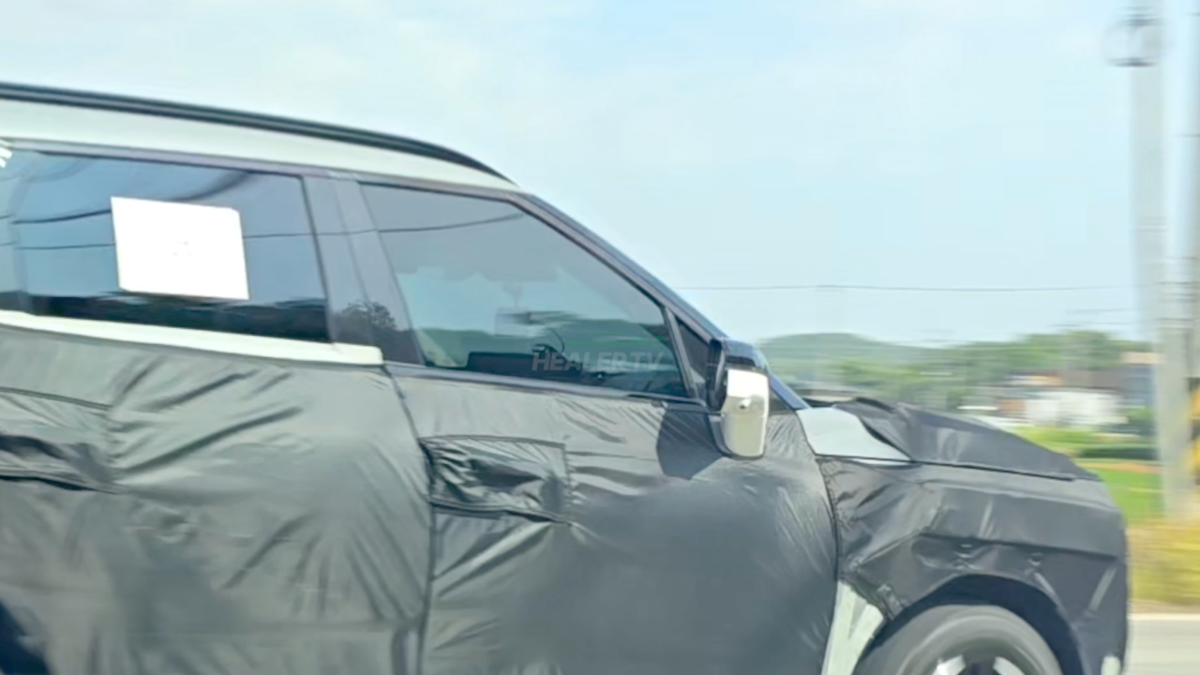
Healer TV/YouTube
A Crucial Model Gets Ready for Its Next Chapter
Saying the Sportage is important for Kia is an understatement. It’s one of the brand’s top sellers worldwide, and in the US, it’s currently wearing the sales crown.
In just the first half of 2026, Kia moved 78,912 Sportages in America alone – a comfortable gap versus the Telluride (62,170) and the new K4 (63,026). The hybrid versions are also flying off the lots, quickly becoming a key piece of Kia’s sales puzzle.
The next-gen Sportage should break cover sometime next year, with a US launch likely as a 2028 model since the 2027 Sportage has already been announced. Word from Korea is that Kia might go all-in on hybrids in some markets, but American buyers can probably still count on at least one gas-powered option alongside the electrified lineup.
Join the conversation
You can post now and register later. If you have an account, sign in now to post with your account.