_811205.png)
_e196d8.png)
_32b3d9.png)
_1c53fe.png)

American Express today announced that you can now redeem Membership Rewards points when checking out with Apple Pay on the web and in apps on the iPhone and iPad.
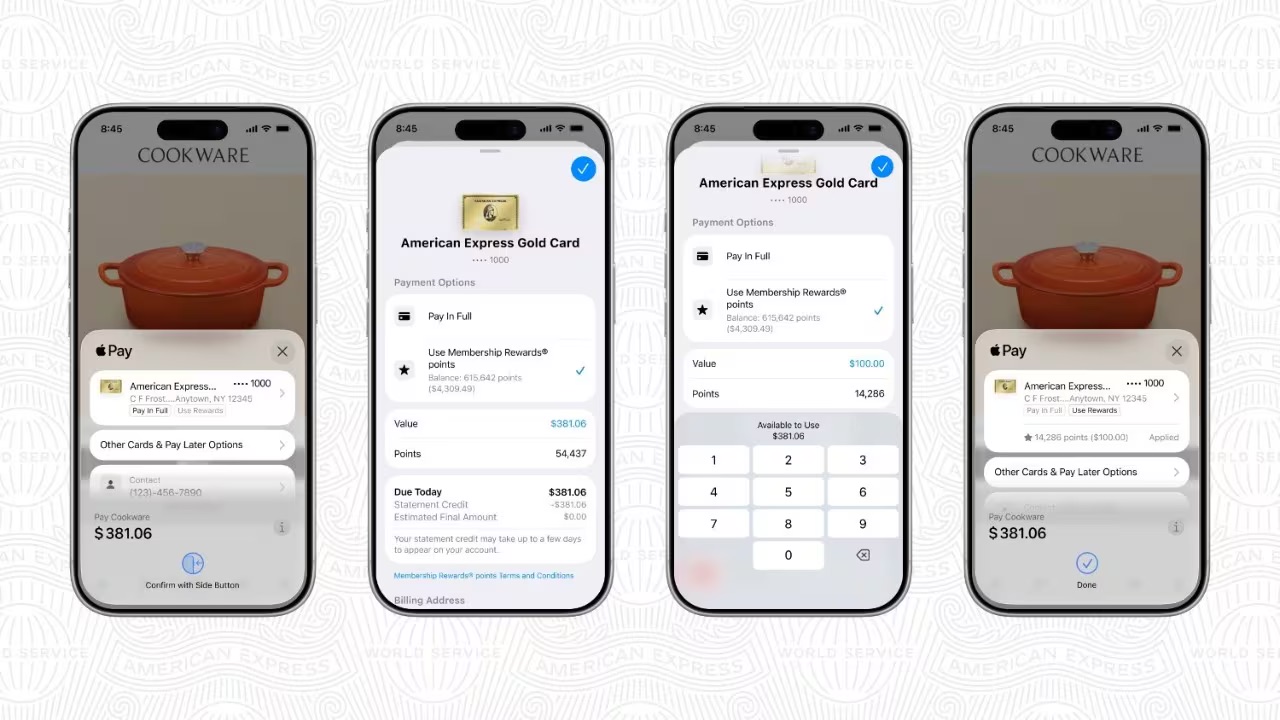
When checking out with Apple Pay on iOS 18 or iPadOS 18 or later, tap on your eligible American Express card (Platinum, Gold, Green, and others) and select the Membership Rewards points option. You can use points to cover all or part of your purchase, with every 10,000 points redeemed through Apple Pay worth a $70 statement credit.
American Express points can be redeemed entirely within the Apple Pay checkout flow, with no need to open another app or complete additional steps.
This article, "American Express Announces New Apple Pay Feature" first appeared on MacRumors.com
Discuss this article in our forums
When checking out with Apple Pay on iOS 18 or iPadOS 18 or later, tap on your eligible American Express card (Platinum, Gold, Green, and others) and select the Membership Rewards points option. You can use points to cover all or part of your purchase, with every 10,000 points redeemed through Apple Pay worth a $70 statement credit.
American Express points can be redeemed entirely within the Apple Pay checkout flow, with no need to open another app or complete additional steps.
Related Roundup: Apple Pay
Tag: American Express
Related Forum: Apple Music, Apple Pay/Card, iCloud, Fitness+
This article, "American Express Announces New Apple Pay Feature" first appeared on MacRumors.com
Discuss this article in our forums
Recommended Comments
Join the conversation
You can post now and register later. If you have an account, sign in now to post with your account.