_811205.png)
_e196d8.png)
_32b3d9.png)
_1c53fe.png)

tvOS 26.4 includes a new Genius Browse section in the Apple TV app, which gives recommendations for TV shows and movies across multiple suggested categories.
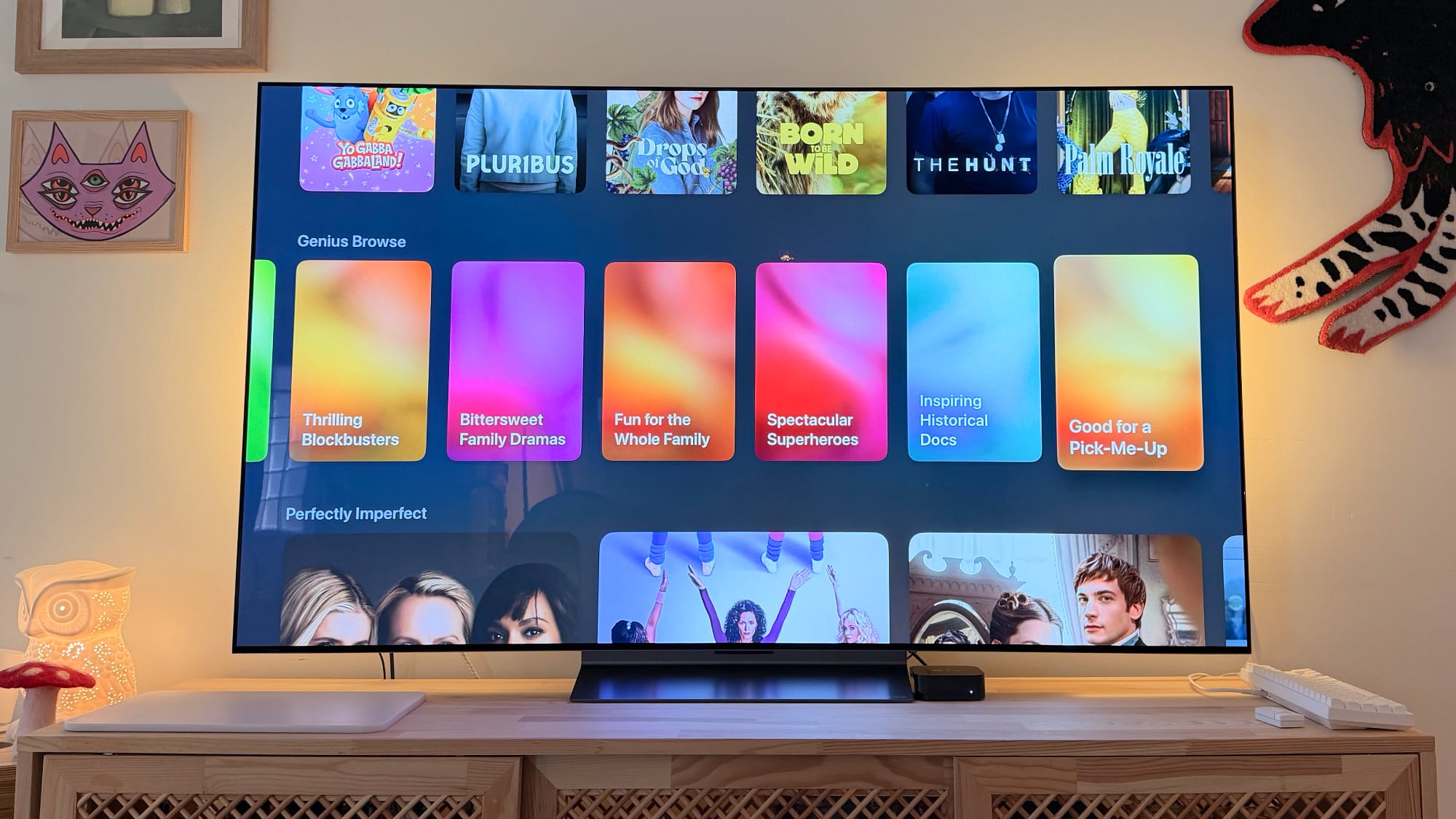
Suggestions vary based on your content preferences, and the categories are updated regularly. Some example categories include Upbeat Workplace Comedies, Tense Psychological Thrillers, History Gets Hilarious, Breathtaking Nature Docs, Thrilling Blockbusters, Bittersweet Family Dramas, and Fun for the Whole Family.
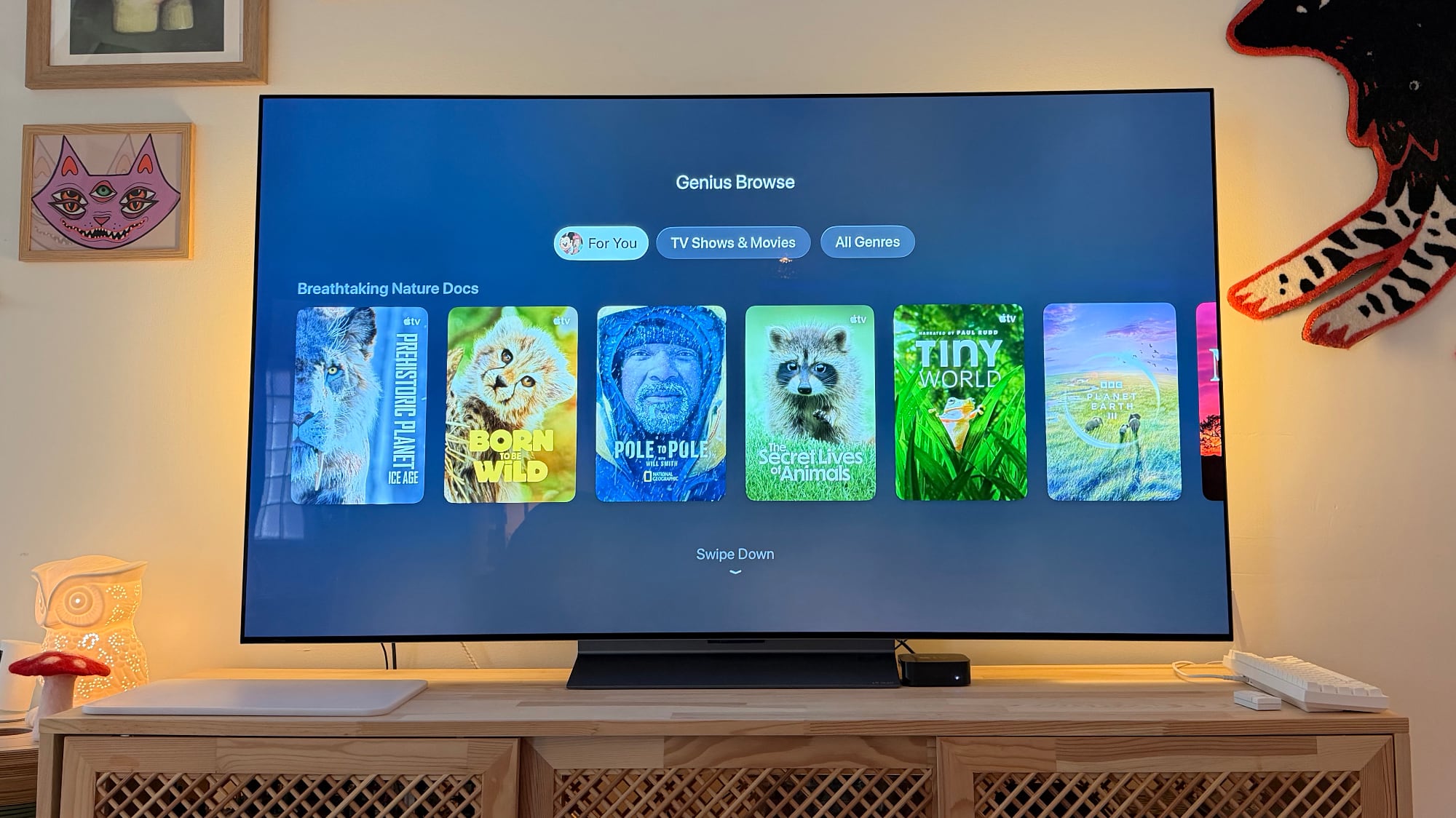
Selecting one of the categories provides a list of relevant content suggestions, which can be further explored with For You, TV Shows and Movies, and Genres sections. When browsing through the suggested movies and TV shows, tvOS 26.4 also provides titles related to the one that's highlighted.
Genius Browse suggestions are not static and will continually show new content categories. The content that Apple suggests is not limited to shows and movies on the Apple TV service, though those are included. Apple suggests titles from other streaming services like HBO Max and Amazon Prime. As with other Apple TV app suggestions, Netflix content is not included.
Apple is limiting Genius Browse to tvOS 26.4, and you won't find the option in iOS 26.4, iPadOS 26.4, or macOS 26.4.
tvOS 26.4 also phases out the dedicated iTunes Movies and iTunes TV Show apps, plus it improves Apple TV Audio Format settings and adds more easily accessible customization options for subtitles.
We're expecting tvOS 26.4 to be released as soon as next week.
This article, "Apple Adds 'Genius Browse' Movie and TV Recommendations to Apple TV in tvOS 26.4" first appeared on MacRumors.com
Discuss this article in our forums
Suggestions vary based on your content preferences, and the categories are updated regularly. Some example categories include Upbeat Workplace Comedies, Tense Psychological Thrillers, History Gets Hilarious, Breathtaking Nature Docs, Thrilling Blockbusters, Bittersweet Family Dramas, and Fun for the Whole Family.
Selecting one of the categories provides a list of relevant content suggestions, which can be further explored with For You, TV Shows and Movies, and Genres sections. When browsing through the suggested movies and TV shows, tvOS 26.4 also provides titles related to the one that's highlighted.
Genius Browse suggestions are not static and will continually show new content categories. The content that Apple suggests is not limited to shows and movies on the Apple TV service, though those are included. Apple suggests titles from other streaming services like HBO Max and Amazon Prime. As with other Apple TV app suggestions, Netflix content is not included.
Apple is limiting Genius Browse to tvOS 26.4, and you won't find the option in iOS 26.4, iPadOS 26.4, or macOS 26.4.
tvOS 26.4 also phases out the dedicated iTunes Movies and iTunes TV Show apps, plus it improves Apple TV Audio Format settings and adds more easily accessible customization options for subtitles.
We're expecting tvOS 26.4 to be released as soon as next week.
Related Roundup: Apple TV
Buyer's Guide: Apple TV (Don't Buy)
Related Forum: Apple TV and Home Theater
This article, "Apple Adds 'Genius Browse' Movie and TV Recommendations to Apple TV in tvOS 26.4" first appeared on MacRumors.com
Discuss this article in our forums
Recommended Comments
Join the conversation
You can post now and register later. If you have an account, sign in now to post with your account.