_811205.png)
_e196d8.png)
_32b3d9.png)
_1c53fe.png)

Apple was founded 50 years ago today, and the company has celebrated the milestone in a variety of ways over the past few weeks, as outlined below.

Apple's CEO Tim Cook kicked things off by sharing a letter titled "50 Years of Thinking Different" on Apple's website. The letter touches on the 50th anniversary and says that "the world is moved forward by people who think different."
"Think Different" was a famous slogan used by Apple in the late 1990s to early 2000s.
"At Apple, we're more focused on building tomorrow than remembering yesterday," a part of Cook's letter reads. "But we couldn't let this milestone pass without thanking the millions of people who make Apple what it is today."
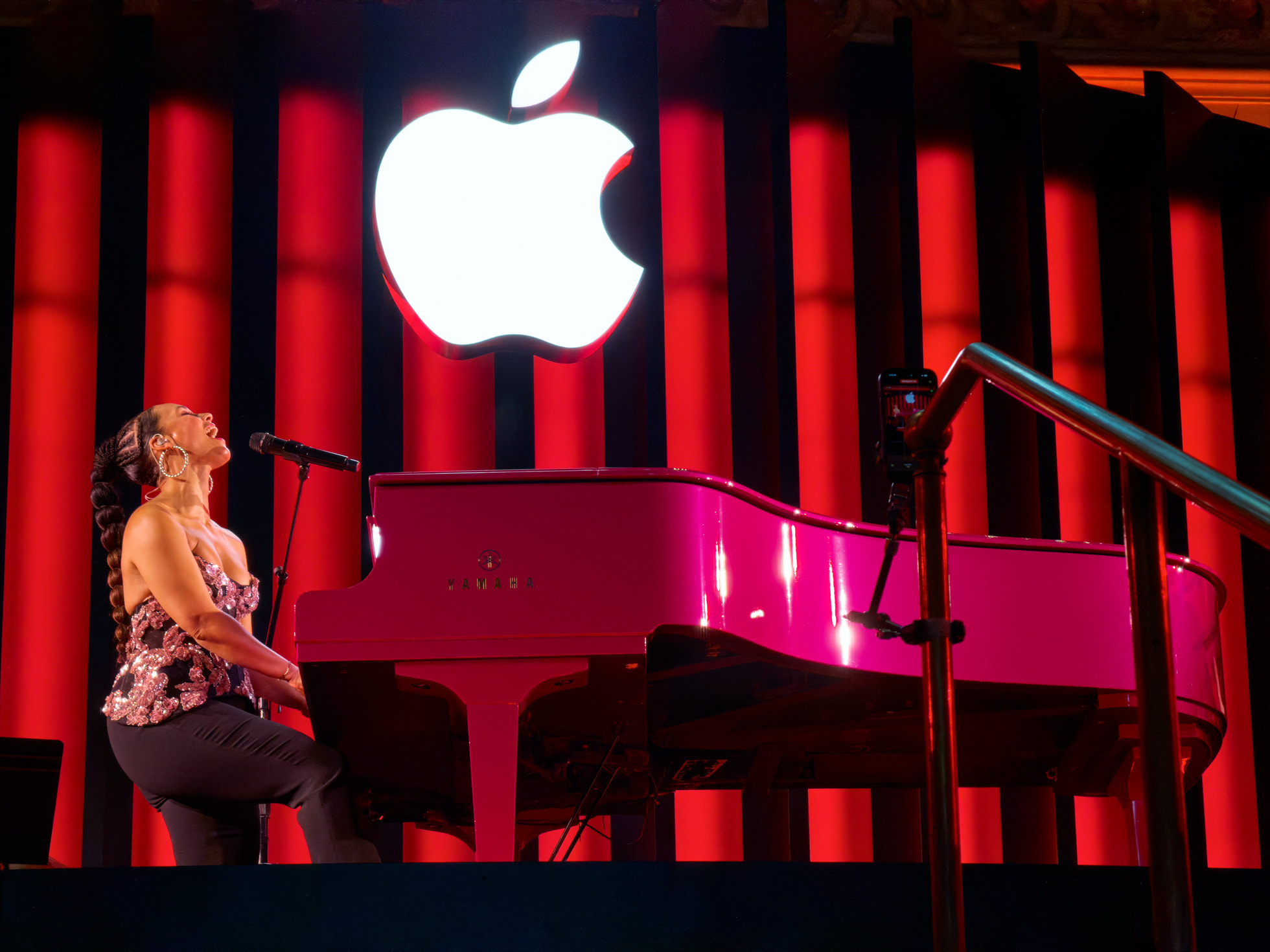
Second, Apple celebrated the anniversary by hosting surprise concerts and events around the world in the second half of March. Alicia Keys performed at Apple's store inside New York's Grand Central Terminal, Mumford & Sons took the stage outside of Apple's UK headquarters at the former Battersea Power Station in London, models walked around a catwalk set up in front of Apple's Jing'an store as part of Shanghai Fashion Week, Apple illuminated iPad artwork on the Sydney Opera House's sails, and much more.
Third, much of Apple's senior leadership gathered at Apple Park to ring the Nasdaq stock market index's opening bell on Tuesday morning. Apple executives in attendance included Cook, operations chief Sabih Khan, services chief Eddy Cue, retail chief Deirdre O'Brien, marketing chief Greg Joswiak, financial chief Kevan Parekh, hardware engineering chief John Ternus, hardware design chief Molly Anderson, and others.
Fourth, Apple set up various installations inside Apple Park, including a showcase of various iMac designs released between 1998 and 2021.
Fifth, Apple's employees received 50th-anniversary merchandise, including a commemorative t-shirt, a limited-edition poster, and a "50" pin.
Sixth, Apple's employees were invited to watch legendary musician Paul McCartney perform under the rainbow arches at Apple Park on Tuesday evening.
And finally, Apple marked its 50th anniversary today by updating the homepage of its website with an animation and sharing a rewind video.
Apple may have a few other things in store for us, but with it now being April 1, the anniversary celebrations are likely wrapping up. So far, the company has not publicly released any special products or merchandise to mark the occasion.
Related Reading: Apple Turns 50 Today: Reflecting on Each Decade's Biggest Moments
This article, "Apple Celebrates 50th Anniversary in Seven Ways" first appeared on MacRumors.com
Discuss this article in our forums
Apple's CEO Tim Cook kicked things off by sharing a letter titled "50 Years of Thinking Different" on Apple's website. The letter touches on the 50th anniversary and says that "the world is moved forward by people who think different."
"Think Different" was a famous slogan used by Apple in the late 1990s to early 2000s.
"At Apple, we're more focused on building tomorrow than remembering yesterday," a part of Cook's letter reads. "But we couldn't let this milestone pass without thanking the millions of people who make Apple what it is today."
Second, Apple celebrated the anniversary by hosting surprise concerts and events around the world in the second half of March. Alicia Keys performed at Apple's store inside New York's Grand Central Terminal, Mumford & Sons took the stage outside of Apple's UK headquarters at the former Battersea Power Station in London, models walked around a catwalk set up in front of Apple's Jing'an store as part of Shanghai Fashion Week, Apple illuminated iPad artwork on the Sydney Opera House's sails, and much more.
Third, much of Apple's senior leadership gathered at Apple Park to ring the Nasdaq stock market index's opening bell on Tuesday morning. Apple executives in attendance included Cook, operations chief Sabih Khan, services chief Eddy Cue, retail chief Deirdre O'Brien, marketing chief Greg Joswiak, financial chief Kevan Parekh, hardware engineering chief John Ternus, hardware design chief Molly Anderson, and others.
REPLAY from yesterday's celebration: Welcoming Apple [AAPL] to the @NasdaqExchange Opening Bell in celebration of their 50th anniversary. #Apple50 pic.twitter.com/DUeKDfPo0P
— Nasdaq Exchange (@NasdaqExchange) April 1, 2026
Fourth, Apple set up various installations inside Apple Park, including a showcase of various iMac designs released between 1998 and 2021.
Apple 50th anniversary installation at the office featuring classic Mac lineup pic.twitter.com/bxX1y9yGdr
— Sam Haveson (@samhaves) March 31, 2026
Fifth, Apple's employees received 50th-anniversary merchandise, including a commemorative t-shirt, a limited-edition poster, and a "50" pin.
Sixth, Apple's employees were invited to watch legendary musician Paul McCartney perform under the rainbow arches at Apple Park on Tuesday evening.
And finally, Apple marked its 50th anniversary today by updating the homepage of its website with an animation and sharing a rewind video.
50 years of Apple, 50 years of innovation.
— Tim Cook (@tim_cook) April 1, 2026
Thank you to our teams, our users, and everyone who’s been part of the journey. #Apple50 pic.twitter.com/YYkMN24Vzc
Apple may have a few other things in store for us, but with it now being April 1, the anniversary celebrations are likely wrapping up. So far, the company has not publicly released any special products or merchandise to mark the occasion.
Related Reading: Apple Turns 50 Today: Reflecting on Each Decade's Biggest Moments
This article, "Apple Celebrates 50th Anniversary in Seven Ways" first appeared on MacRumors.com
Discuss this article in our forums
Recommended Comments
Join the conversation
You can post now and register later. If you have an account, sign in now to post with your account.