_811205.png)
_e196d8.png)
_32b3d9.png)
_1c53fe.png)

RR Auction has announced that an Apple check signed by the company's co-founders Steve Jobs and Steve Wozniak fetched a whopping $2.4 million at auction this week. The check was for $500, meaning that it sold for 4,800× its original value.
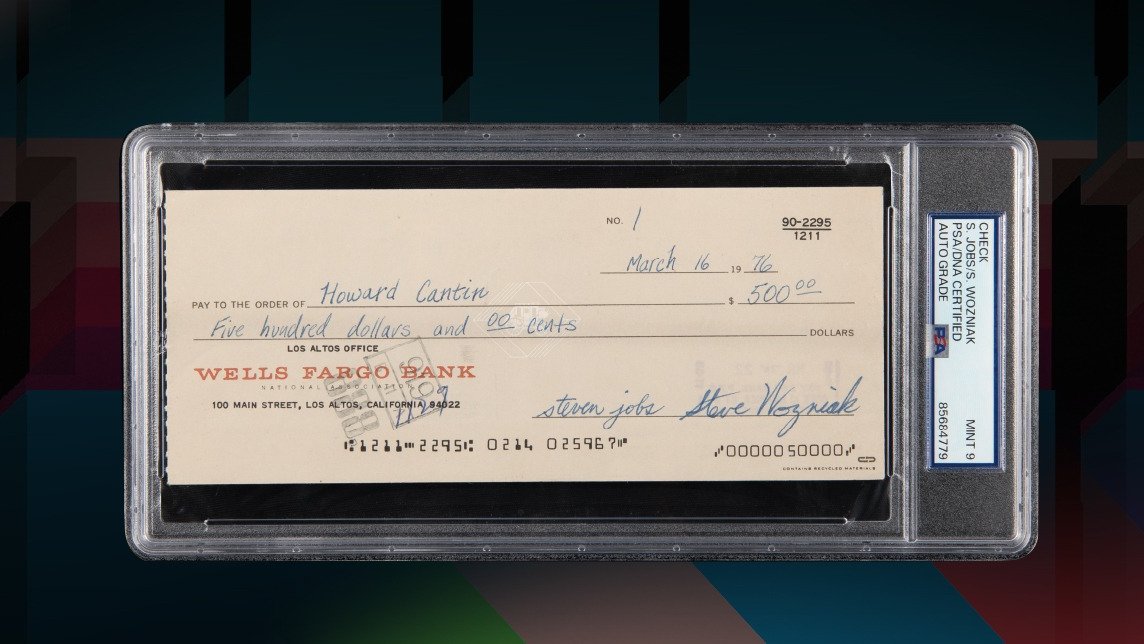
According to RR Auction, the $500 check was issued to printed circuit board designer Howard Cantin, shortly after Jobs and Wozniak opened Apple's first bank account. Cantin was responsible for translating Wozniak's Apple-1 schematic into a manufacturable printed circuit board, leading to Apple's first commercial product.
Dated March 16, 1976, the Wells Fargo check is marked "No. 1." It was issued a few weeks before Apple Computer was officially founded on April 1, 1976.
“This is the most important financial document in Apple history," said Bobby Livingston, executive vice president at RR Auction. "It captures Steve Jobs and Steve Wozniak's first true business transaction, and the final result shows that collectors recognized its significance above any other Apple material ever brought to market."
This article, "Apple Check Signed by Steve Jobs Sells for 4,800× Its Original Value" first appeared on MacRumors.com
Discuss this article in our forums
According to RR Auction, the $500 check was issued to printed circuit board designer Howard Cantin, shortly after Jobs and Wozniak opened Apple's first bank account. Cantin was responsible for translating Wozniak's Apple-1 schematic into a manufacturable printed circuit board, leading to Apple's first commercial product.
Dated March 16, 1976, the Wells Fargo check is marked "No. 1." It was issued a few weeks before Apple Computer was officially founded on April 1, 1976.
“This is the most important financial document in Apple history," said Bobby Livingston, executive vice president at RR Auction. "It captures Steve Jobs and Steve Wozniak's first true business transaction, and the final result shows that collectors recognized its significance above any other Apple material ever brought to market."
Tag: Steve Jobs
This article, "Apple Check Signed by Steve Jobs Sells for 4,800× Its Original Value" first appeared on MacRumors.com
Discuss this article in our forums
Recommended Comments
Join the conversation
You can post now and register later. If you have an account, sign in now to post with your account.