_811205.png)
_e196d8.png)
_32b3d9.png)
_1c53fe.png)

iOS 27 includes an entirely revamped Genmoji creation experience. There's an updated interface that supports describing an emoji that you want to create, with options to start from existing emoji, choose an image from Photos, or select a person.
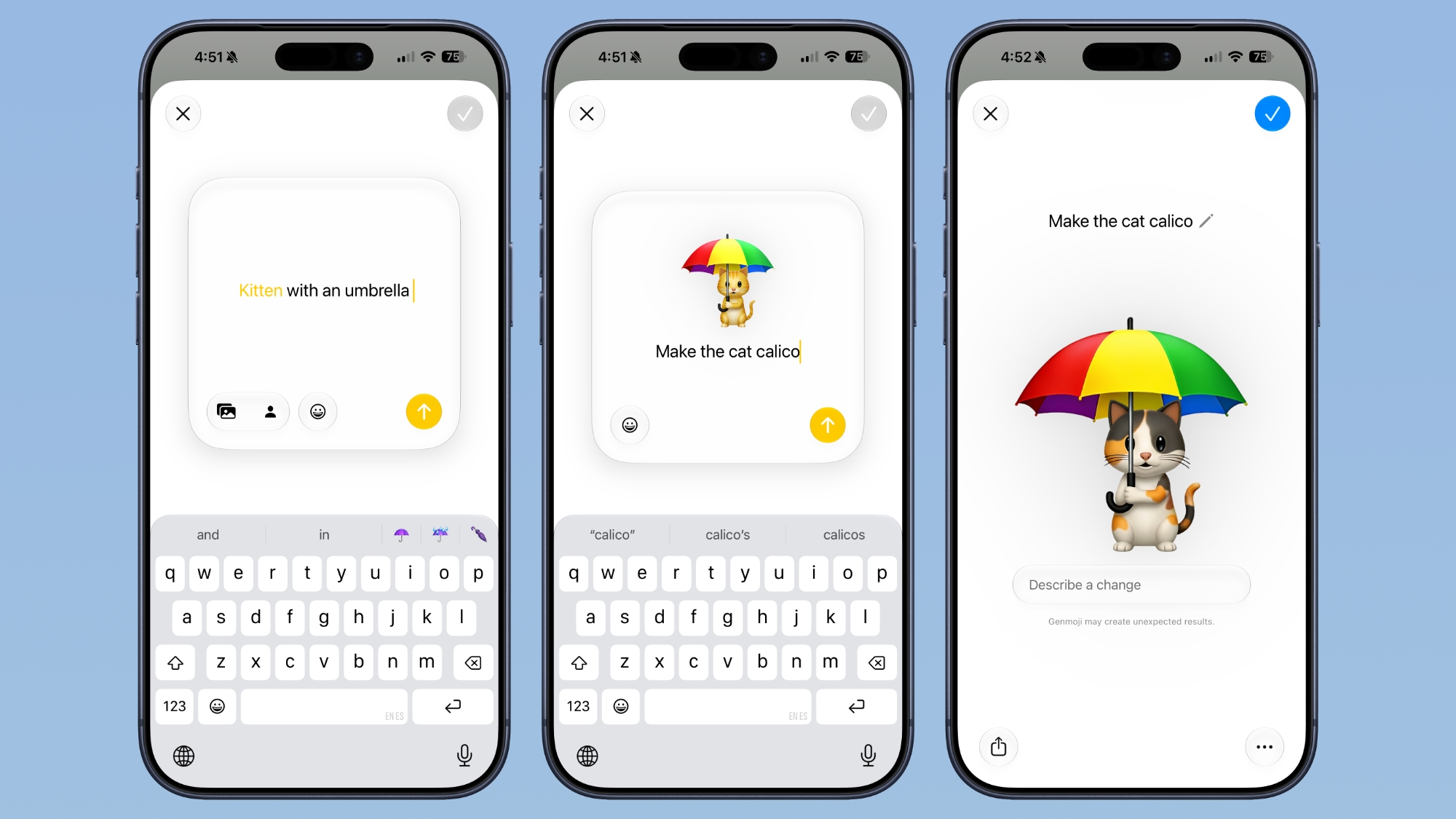
After uploading an image or using a text phrase to create a Genmoji, there's now a "Describe a change" interface for making updates to what you've already created. You can iterate on designs and change specific elements of a Genmoji, tweaking colors and objects.
Apple's AI is smarter than before and it is able to successfully make iterative updates for better Genmoji customization. Each change uses the old base rather than regenerating a new Genmoji with every request. With a series of requests, it is possible to make a complicated, multi-element Genmoji. Along with describing changes, you can also add in additional emoji, and the interface makes suggestions on what to do next.
Genmoji output is also more consistent, and Genmoji look more like real emoji with a 3D, cartoonish style by default. There is now an option to change style, so if you don't want the cartoonish look, you can ask for something else like a drawing or a sketch.
Generating a Genmoji does not take as long, and it appears to be less system intensive with less battery drain.
Apple also overhauled Image Playground in iOS 27, and both Image Playground and Genmoji use updated Apple Foundation Models. Image Playground now supports generating photorealistic images and adding AI elements to just parts of photos.
This article, "Apple Overhauls Genmoji in iOS 27" first appeared on MacRumors.com
Discuss this article in our forums
After uploading an image or using a text phrase to create a Genmoji, there's now a "Describe a change" interface for making updates to what you've already created. You can iterate on designs and change specific elements of a Genmoji, tweaking colors and objects.
Apple's AI is smarter than before and it is able to successfully make iterative updates for better Genmoji customization. Each change uses the old base rather than regenerating a new Genmoji with every request. With a series of requests, it is possible to make a complicated, multi-element Genmoji. Along with describing changes, you can also add in additional emoji, and the interface makes suggestions on what to do next.
Genmoji output is also more consistent, and Genmoji look more like real emoji with a 3D, cartoonish style by default. There is now an option to change style, so if you don't want the cartoonish look, you can ask for something else like a drawing or a sketch.
Generating a Genmoji does not take as long, and it appears to be less system intensive with less battery drain.
Apple also overhauled Image Playground in iOS 27, and both Image Playground and Genmoji use updated Apple Foundation Models. Image Playground now supports generating photorealistic images and adding AI elements to just parts of photos.
Related Roundup: iOS 27
Tag: Genmoji
This article, "Apple Overhauls Genmoji in iOS 27" first appeared on MacRumors.com
Discuss this article in our forums
Recommended Comments
Join the conversation
You can post now and register later. If you have an account, sign in now to post with your account.