_811205.png)
_e196d8.png)
_32b3d9.png)
_1c53fe.png)

Apple is preparing to bring support for its digital car key feature to Tata EV vehicles, based on evidence uncovered by MacRumors on Apple's backend.
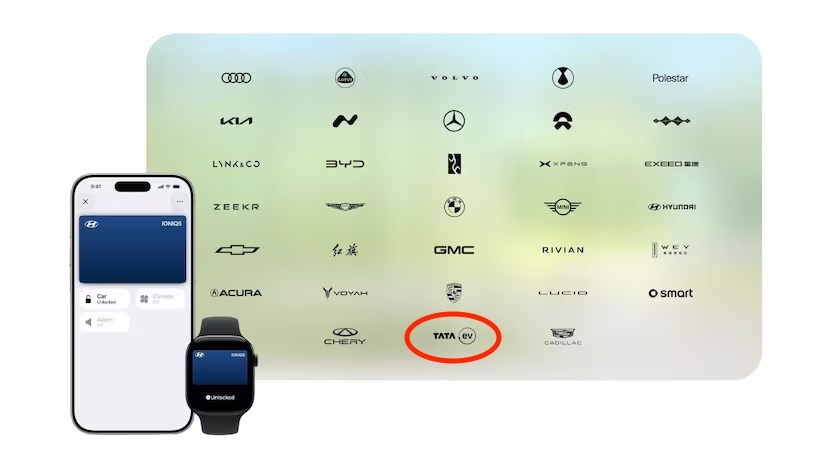
Tata is an Indian multinational commercial vehicle manufacturer, headquartered in Mumbai. The company produces trucks, vans, and buses, and is now on an internal Apple list of vehicles that offer car key integration, but it is not known which EV models the support pertains to.
Introduced in 2022, Car Keys allows an iPhone or Apple Watch to unlock a vehicle through the Wallet app. A digital version of a car key is stored in Wallet, and unlocking can be done by holding an Apple Watch or iPhone near a compatible vehicle's NFC reader.
A tap on the door handle is enough to initiate an unlock, and while Face ID authentication is a security option, Apple offers an Express Mode that eliminates the need to authenticate for a faster unlocking process.
At WWDC 2025, Apple confirmed that 13 vehicle brands would "soon" add support for digital car keys, and Tata was on the list. Vehicles from BMW, Genesis, Kia, Hyundai, Lotus, Mercedes, Volvo, and more offer car keys support, with a list available on MacRumors.com.
This article, "Apple Set to Add Car Key Support for India's Tata Vehicles" first appeared on MacRumors.com
Discuss this article in our forums
Tata is an Indian multinational commercial vehicle manufacturer, headquartered in Mumbai. The company produces trucks, vans, and buses, and is now on an internal Apple list of vehicles that offer car key integration, but it is not known which EV models the support pertains to.
Introduced in 2022, Car Keys allows an iPhone or Apple Watch to unlock a vehicle through the Wallet app. A digital version of a car key is stored in Wallet, and unlocking can be done by holding an Apple Watch or iPhone near a compatible vehicle's NFC reader.
A tap on the door handle is enough to initiate an unlock, and while Face ID authentication is a security option, Apple offers an Express Mode that eliminates the need to authenticate for a faster unlocking process.
At WWDC 2025, Apple confirmed that 13 vehicle brands would "soon" add support for digital car keys, and Tata was on the list. Vehicles from BMW, Genesis, Kia, Hyundai, Lotus, Mercedes, Volvo, and more offer car keys support, with a list available on MacRumors.com.
Tags: iPhone Car Keys, India
This article, "Apple Set to Add Car Key Support for India's Tata Vehicles" first appeared on MacRumors.com
Discuss this article in our forums
Recommended Comments
Join the conversation
You can post now and register later. If you have an account, sign in now to post with your account.