_811205.png)
_e196d8.png)
_32b3d9.png)
_1c53fe.png)

In addition to teasing WWDC 2026 with a new tagline today, Apple has shared a wallpaper, playlist, and a "Get Ready" video ahead of the event.
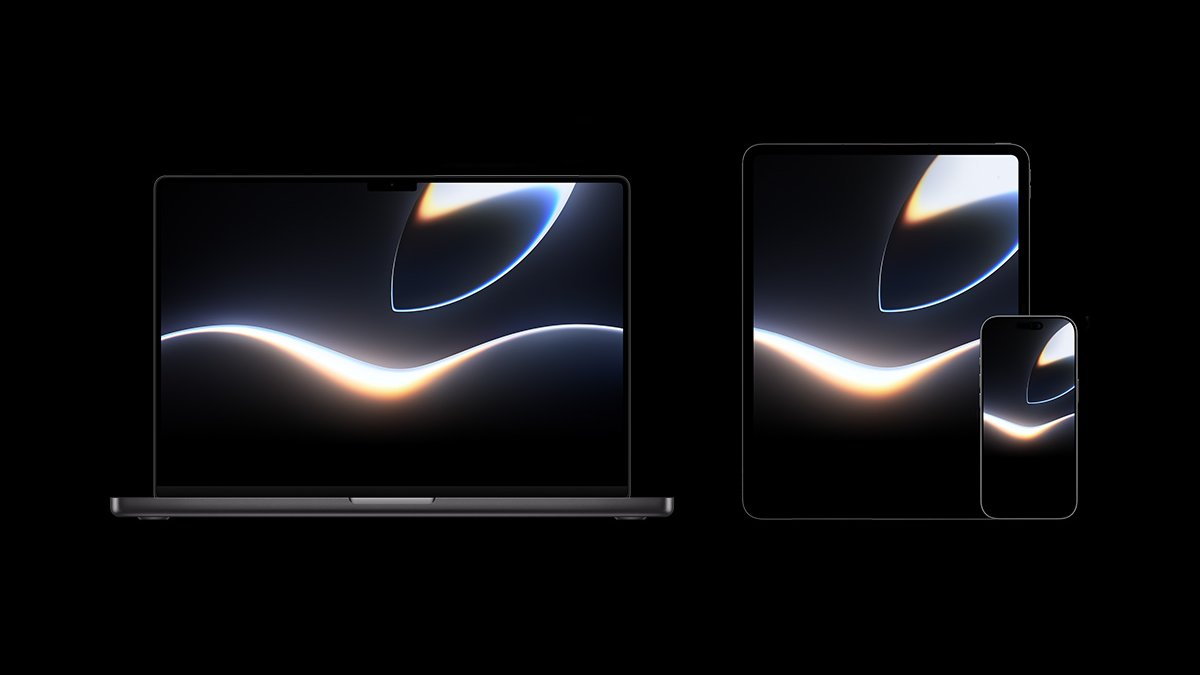
iPhone, iPad, and Mac versions of the wallpaper are available to download on Apple's website. The wallpaper features a dark color scheme with a glowing Apple logo, which likely hints at Siri's rumored new design coming with iOS 27.
The wallpaper page has a "Glow all out" tagline, which adds to the "All systems glow" and "Coming bright up" taglines that Apple previously shared.
A new "WWDC26 Hello" playlist is available on Apple Music, with more playlists to follow throughout the weeklong developers conference.
WWDC 2026 kicks off with Apple's keynote on Monday, June 8 at 10 a.m. Pacific Time. The company is set to unveil iOS 27, iPadOS 27, macOS 27, watchOS 27, tvOS 27, and visionOS 27 on that day, and the conference will run through Friday, June 12, with hundreds of developer sessions to be shared online.
The keynote will be streamed live on the Apple Events website — the page is now live. There will also be streams in the Apple TV app and on YouTube.
For developers, Apple has shared a new "Get Ready" video that offers tips on how to take advantage of WWDC, with all content and resources to be released for free as always. While there will be an in-person component at Apple Park for some lucky attendees, WWDC has largely been an online event since 2020.
MacRumors will be attending WWDC 2026 in person, and we will have in-depth coverage of the event as always, so stay tuned.
This article, "Apple Shares WWDC26 Wallpaper, Playlist, 'Get Ready' Video, and More" first appeared on MacRumors.com
Discuss this article in our forums
iPhone, iPad, and Mac versions of the wallpaper are available to download on Apple's website. The wallpaper features a dark color scheme with a glowing Apple logo, which likely hints at Siri's rumored new design coming with iOS 27.
The wallpaper page has a "Glow all out" tagline, which adds to the "All systems glow" and "Coming bright up" taglines that Apple previously shared.
A new "WWDC26 Hello" playlist is available on Apple Music, with more playlists to follow throughout the weeklong developers conference.
WWDC 2026 kicks off with Apple's keynote on Monday, June 8 at 10 a.m. Pacific Time. The company is set to unveil iOS 27, iPadOS 27, macOS 27, watchOS 27, tvOS 27, and visionOS 27 on that day, and the conference will run through Friday, June 12, with hundreds of developer sessions to be shared online.
The keynote will be streamed live on the Apple Events website — the page is now live. There will also be streams in the Apple TV app and on YouTube.
For developers, Apple has shared a new "Get Ready" video that offers tips on how to take advantage of WWDC, with all content and resources to be released for free as always. While there will be an in-person component at Apple Park for some lucky attendees, WWDC has largely been an online event since 2020.
MacRumors will be attending WWDC 2026 in person, and we will have in-depth coverage of the event as always, so stay tuned.
Related Roundup: WWDC 2026
Related Forum: Apple, Inc and Tech Industry
This article, "Apple Shares WWDC26 Wallpaper, Playlist, 'Get Ready' Video, and More" first appeared on MacRumors.com
Discuss this article in our forums
Recommended Comments
Join the conversation
You can post now and register later. If you have an account, sign in now to post with your account.