_811205.png)
_e196d8.png)
_32b3d9.png)
_1c53fe.png)

Photos have been making the rounds on Chinese social media today showing an Honor-branded advertising truck parked directly in front of Apple Canton Road store in Hong Kong, promoting the company's new Honor 600 series smartphone.
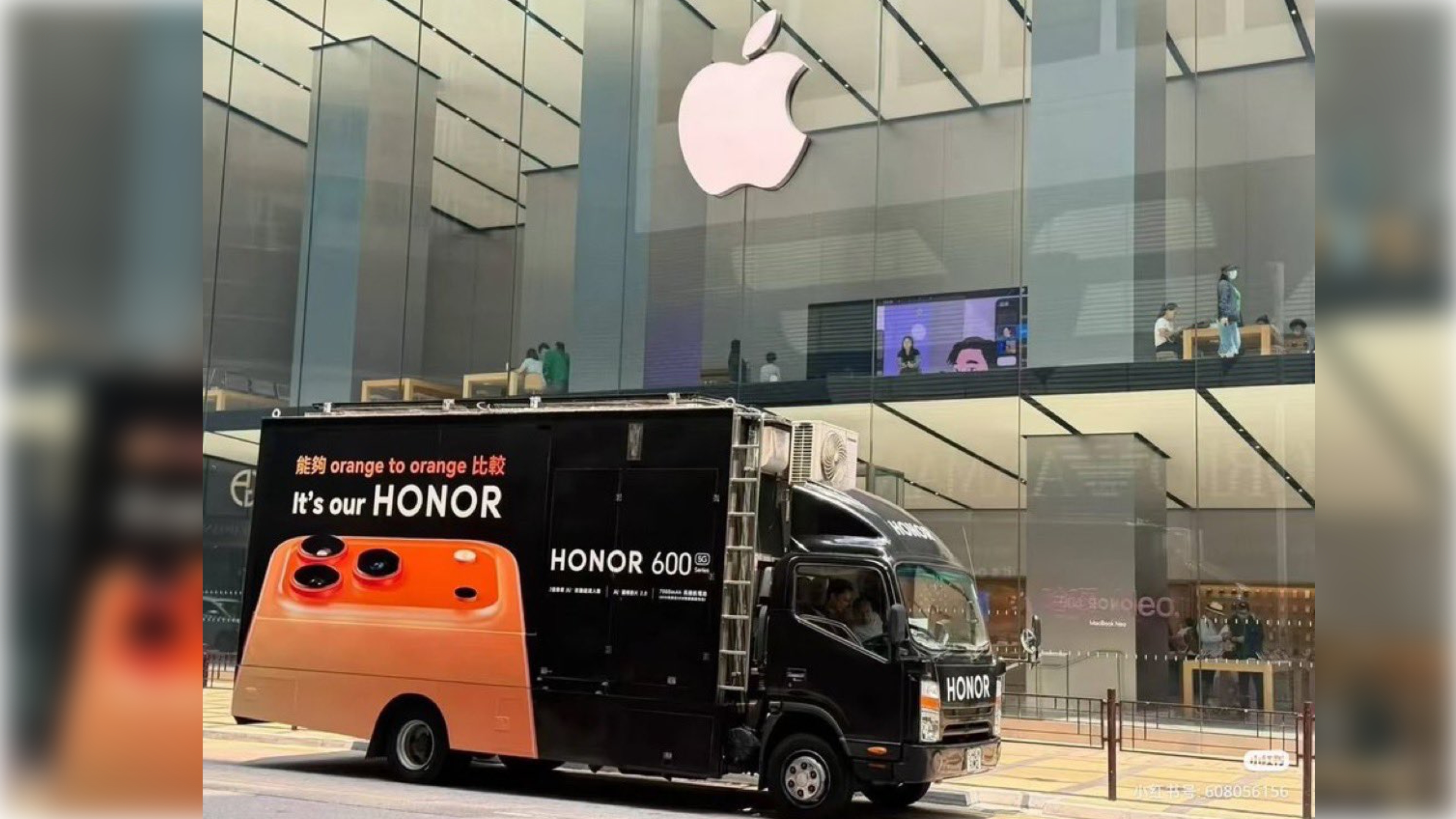
The truck's ad features the slogan "It's our HONOR" alongside the phrase "orange to orange," which appears to be a play on the English idiom "apples to apples" – referring to a like-for-like comparison. The slogan is paired with an image of the Honor phone, in a finish that bears more than a passing resemblance to the iPhone 17 Pro's Cosmic Orange.
It's a brazen stunt for a brand that spun off from Huawei in 2020 before being sold off to another entity to bypass U.S. sanctions. Using Apple's retail store as a backdrop to pitch your rival device with a similar color is one thing, but when the design is arguably a shameless copy, you're definitely out of ideas.
Apple is unlikely to make a big stink about such guerrilla marketing, as it would only amplify it. And as they say, imitation is the sincerest form of flattery.
This article, "Apple Store Becomes Backdrop for Honor's Brazen Hong Kong Ad Stunt" first appeared on MacRumors.com
Discuss this article in our forums
The truck's ad features the slogan "It's our HONOR" alongside the phrase "orange to orange," which appears to be a play on the English idiom "apples to apples" – referring to a like-for-like comparison. The slogan is paired with an image of the Honor phone, in a finish that bears more than a passing resemblance to the iPhone 17 Pro's Cosmic Orange.
It's a brazen stunt for a brand that spun off from Huawei in 2020 before being sold off to another entity to bypass U.S. sanctions. Using Apple's retail store as a backdrop to pitch your rival device with a similar color is one thing, but when the design is arguably a shameless copy, you're definitely out of ideas.
Apple is unlikely to make a big stink about such guerrilla marketing, as it would only amplify it. And as they say, imitation is the sincerest form of flattery.
Tag: Apple Store
This article, "Apple Store Becomes Backdrop for Honor's Brazen Hong Kong Ad Stunt" first appeared on MacRumors.com
Discuss this article in our forums
Recommended Comments
Join the conversation
You can post now and register later. If you have an account, sign in now to post with your account.