_811205.png)
_e196d8.png)
_32b3d9.png)
_1c53fe.png)

Popular Mac menu bar management app Bartender received an upgrade today with the launch of Bartender Pro. Bartender Pro adds a new Top Shelf feature to the Mac's notch, with access to multiple utility tools.

Top Shelf can be used for clipboard access, storing files, controlling audio, and sending content over AirDrop. It supports widgets for calendar, weather, and music apps like Apple Music or Spotify. There's a full Now Playing music controller, and options to get alerts when scheduled events are coming up.
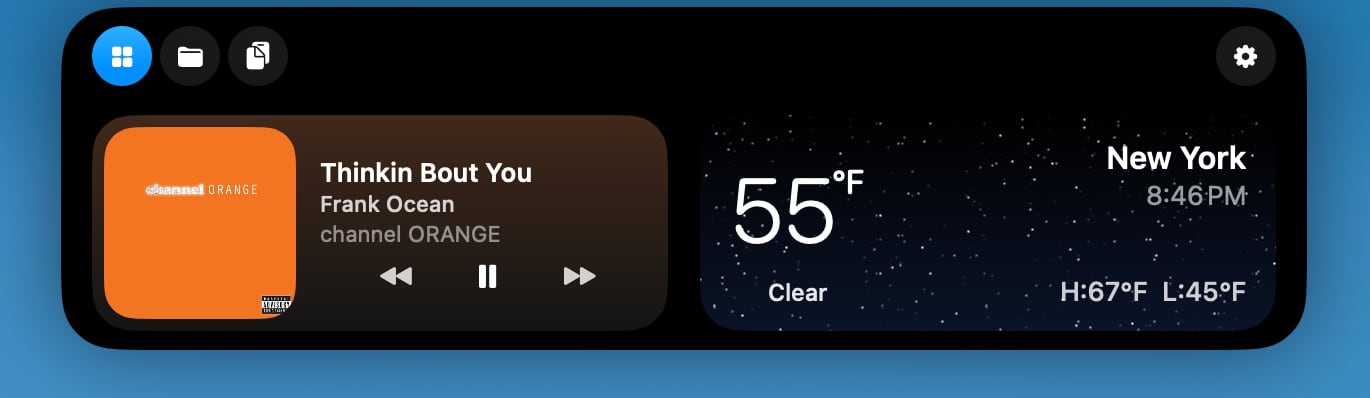
Top Shelf expands the size of the notch, turning it into something like the iPhone's Dynamic Island. Users can drag files over to the notch to store them or send them via AirDrop, and access a clipboard. The clipboard can be set to automatically capture content that's copied, with options to ignore passwords. There are customizable duration options for both the clipboard and file storage.
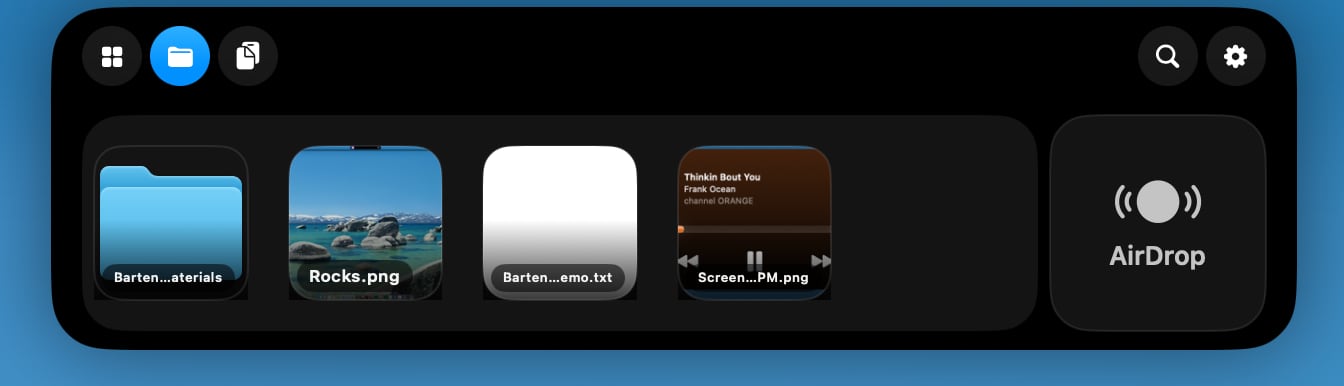
Widgets in Top Shelf are customizable, and it supports a Live Activity-like tracking feature for AI agents like Codex and Claude Code. Info like volume, display brightness, and battery level is also available.
Top Shelf works alongside Bartender, and all of the standard Bartender features are available with Bartender Pro. When not in use, Top Shelf is tucked away much like Bartender, and it disappears when Bartender is expanded. While it is a tool designed around the notch, it also works on Macs that don't have one.

Bartender Pro is optional, and users who don't need the extra features can stick with Bartender 6.
Bartender Pro is priced at $15 per year. The subscription includes Bartender 6, all future upgrades for the subscription duration, and the Bartender Pro suite.
Bartender 6 is still available for a one-time $20 purchase, and the $80 Mega Supporter option continues to offer lifetime Bartender access with Bartender Pro included. Bartender Pro and Bartender 6 are available from the Bartender website.
This article, "Bartender Pro Brings Widgets, Clipboard, and File Storage to the MacBook Notch" first appeared on MacRumors.com
Discuss this article in our forums
Top Shelf can be used for clipboard access, storing files, controlling audio, and sending content over AirDrop. It supports widgets for calendar, weather, and music apps like Apple Music or Spotify. There's a full Now Playing music controller, and options to get alerts when scheduled events are coming up.
Top Shelf expands the size of the notch, turning it into something like the iPhone's Dynamic Island. Users can drag files over to the notch to store them or send them via AirDrop, and access a clipboard. The clipboard can be set to automatically capture content that's copied, with options to ignore passwords. There are customizable duration options for both the clipboard and file storage.
Widgets in Top Shelf are customizable, and it supports a Live Activity-like tracking feature for AI agents like Codex and Claude Code. Info like volume, display brightness, and battery level is also available.
Top Shelf works alongside Bartender, and all of the standard Bartender features are available with Bartender Pro. When not in use, Top Shelf is tucked away much like Bartender, and it disappears when Bartender is expanded. While it is a tool designed around the notch, it also works on Macs that don't have one.
Bartender Pro is optional, and users who don't need the extra features can stick with Bartender 6.
Bartender Pro is priced at $15 per year. The subscription includes Bartender 6, all future upgrades for the subscription duration, and the Bartender Pro suite.
Bartender 6 is still available for a one-time $20 purchase, and the $80 Mega Supporter option continues to offer lifetime Bartender access with Bartender Pro included. Bartender Pro and Bartender 6 are available from the Bartender website.
Tag: Widgets
This article, "Bartender Pro Brings Widgets, Clipboard, and File Storage to the MacBook Notch" first appeared on MacRumors.com
Discuss this article in our forums
Recommended Comments
Join the conversation
You can post now and register later. If you have an account, sign in now to post with your account.