_811205.png)
_e196d8.png)
_32b3d9.png)
_1c53fe.png)

KEYi Tech, the company behind the Loona companion robot and ClicBot modular robot, is showing off a new take on AI assistants at CES 2026 called DeskMate, which is exclusively for iPhone.
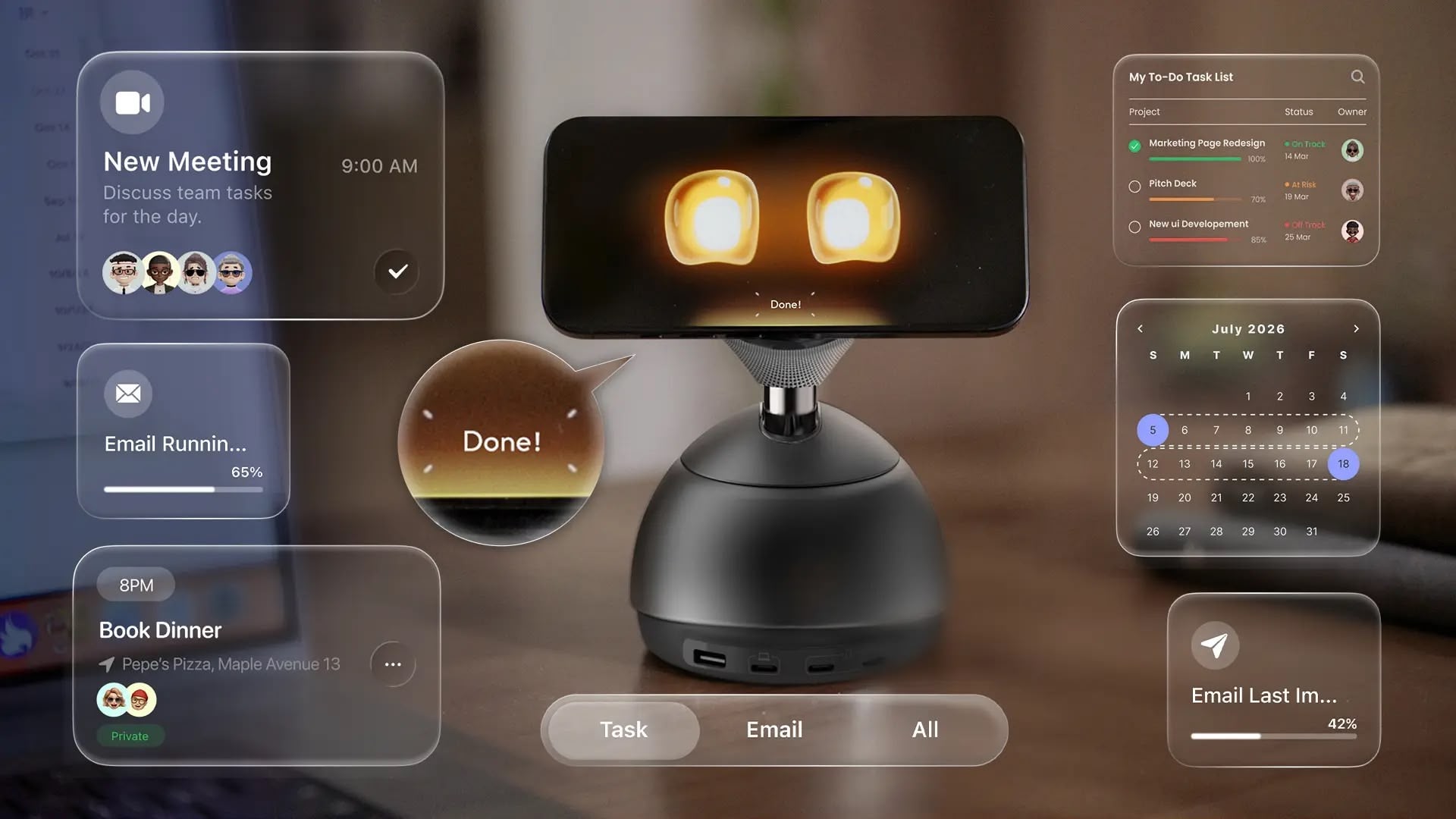
Rather than building another standalone robot, the company has gone with a desktop charging hub that turns an attached iPhone into an AI companion, using your device's existing display, camera, and microphone to bring it to life. Apart from three USB-C ports and one USB-A port, the device features a rotating and tilting MagSafe charging stand that tracks your presence and keeps the iPhone facing you at all times during conversations. It even displays cute Pixar-style animated eyes on the screen.
The companion app automatically activates when you attach an iPhone to the charging pad. From here, the DeskMate is able to handle voice commands, manage your calendar, set reminders, and answer questions throughout the day. According to the company, DeskMate can also initiate conversations, offer suggestions, or provide updates when you return to your desk.
The AI companion integrates with workplace tools including Slack, email, and calendar apps, and it can also join video meetings to take notes or provide summaries. The idea is that it learns your routines and preferences over time, adapting its responses and suggestions accordingly.
KEYi Tech says it plans to launch a Kickstarter campaign in March for the device, which will be priced below $300, although the final costs are apparently still being finalized.
This article, "CES 2026: DeskMate MagSafe Charger Gives Your iPhone AI Personality" first appeared on MacRumors.com
Discuss this article in our forums
Rather than building another standalone robot, the company has gone with a desktop charging hub that turns an attached iPhone into an AI companion, using your device's existing display, camera, and microphone to bring it to life. Apart from three USB-C ports and one USB-A port, the device features a rotating and tilting MagSafe charging stand that tracks your presence and keeps the iPhone facing you at all times during conversations. It even displays cute Pixar-style animated eyes on the screen.
The companion app automatically activates when you attach an iPhone to the charging pad. From here, the DeskMate is able to handle voice commands, manage your calendar, set reminders, and answer questions throughout the day. According to the company, DeskMate can also initiate conversations, offer suggestions, or provide updates when you return to your desk.
The AI companion integrates with workplace tools including Slack, email, and calendar apps, and it can also join video meetings to take notes or provide summaries. The idea is that it learns your routines and preferences over time, adapting its responses and suggestions accordingly.
KEYi Tech says it plans to launch a Kickstarter campaign in March for the device, which will be priced below $300, although the final costs are apparently still being finalized.
Tag: CES 2026
This article, "CES 2026: DeskMate MagSafe Charger Gives Your iPhone AI Personality" first appeared on MacRumors.com
Discuss this article in our forums
Recommended Comments
Join the conversation
You can post now and register later. If you have an account, sign in now to post with your account.