_811205.png)
_e196d8.png)
_32b3d9.png)
_1c53fe.png)

Apple is rumored to be adding an AI feature for creating shortcuts with natural language to the Shortcuts app in iOS 27, but MacStories' Federico Viticci has a clever AI tool for making shortcuts that you can use today.
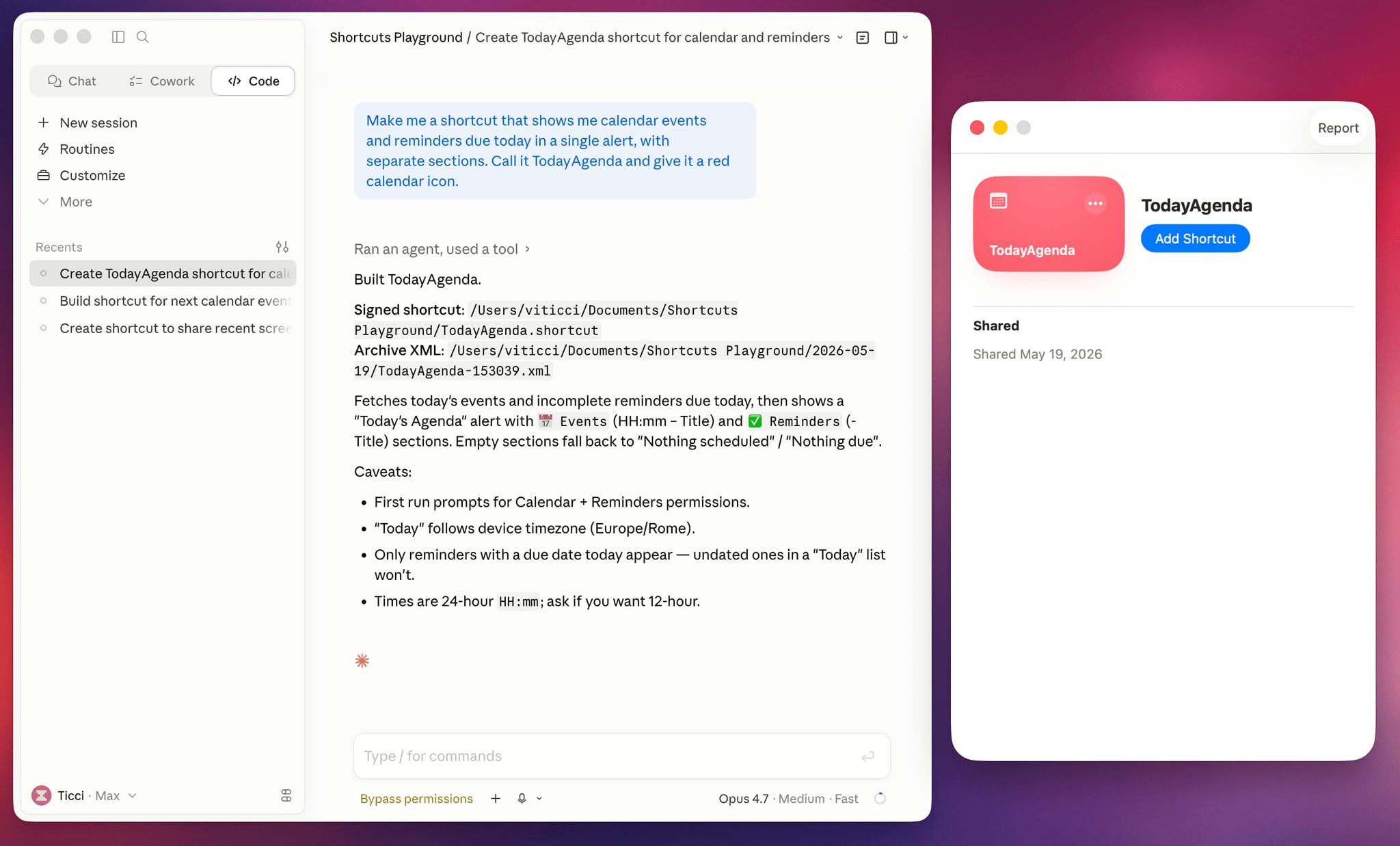
Shortcuts Playground is a plugin for Claude Code and OpenAI Codex that can create shortcuts for the Apple Shortcuts app using natural language input. It's set up to let users type in a short sentence requesting a shortcut, with the final version output to Finder and ready to upload to Apple's Shortcuts app in a few minutes.
Viticci made Shortcuts Playground free and open source, and the plugin is available from GitHub. Viticci provided detailed documentation on how it works, plus anyone can inspect the code. While Claude Code or Codex can correct errors during the shortcut creation process, Viticci warns that shortcuts generated are not guaranteed to be 100 percent accurate, and users should always check the AI's work.
To get Shortcuts Playground, give Claude Code or OpenAI Codex a link to the GitHub repo, and the agent will find the plugin marketplace and install it. Viticci has several example shortcuts, including one that remembers the location of a parked car and guides the driver back to it, and another that adjusts several display settings at night while also turning on a Focus mode.
Club MacStories+ and Premier members can get Shortcuts Playground as a generative shortcut. Once the main plugin is installed on a Mac, there's an option to make more shortcuts using a shortcut and install them directly on an iPhone, iPad, or Mac.
Viticci is also debuting a redesigned MacStories Shortcuts Archive that features over 400 pre-built shortcut options. More information on Shortcuts Playground can be found on MacStories.
This article, "Don't Want to Wait for iOS 27? Shortcuts Playground From MacStories Generates Shortcuts Using AI" first appeared on MacRumors.com
Discuss this article in our forums
Shortcuts Playground is a plugin for Claude Code and OpenAI Codex that can create shortcuts for the Apple Shortcuts app using natural language input. It's set up to let users type in a short sentence requesting a shortcut, with the final version output to Finder and ready to upload to Apple's Shortcuts app in a few minutes.
Viticci made Shortcuts Playground free and open source, and the plugin is available from GitHub. Viticci provided detailed documentation on how it works, plus anyone can inspect the code. While Claude Code or Codex can correct errors during the shortcut creation process, Viticci warns that shortcuts generated are not guaranteed to be 100 percent accurate, and users should always check the AI's work.
To get Shortcuts Playground, give Claude Code or OpenAI Codex a link to the GitHub repo, and the agent will find the plugin marketplace and install it. Viticci has several example shortcuts, including one that remembers the location of a parked car and guides the driver back to it, and another that adjusts several display settings at night while also turning on a Focus mode.
Club MacStories+ and Premier members can get Shortcuts Playground as a generative shortcut. Once the main plugin is installed on a Mac, there's an option to make more shortcuts using a shortcut and install them directly on an iPhone, iPad, or Mac.
Viticci is also debuting a redesigned MacStories Shortcuts Archive that features over 400 pre-built shortcut options. More information on Shortcuts Playground can be found on MacStories.
Related Roundup: iOS 27
Tag: MacStories
This article, "Don't Want to Wait for iOS 27? Shortcuts Playground From MacStories Generates Shortcuts Using AI" first appeared on MacRumors.com
Discuss this article in our forums
Recommended Comments
Join the conversation
You can post now and register later. If you have an account, sign in now to post with your account.