_811205.png)
_e196d8.png)
_32b3d9.png)
_1c53fe.png)

Apple released the first betas of iOS 27, iPadOS 27, and macOS 27 today, introducing a more capable version of Siri called Siri AI. Developers are able to download the betas and try Siri out, but there is a waitlist.
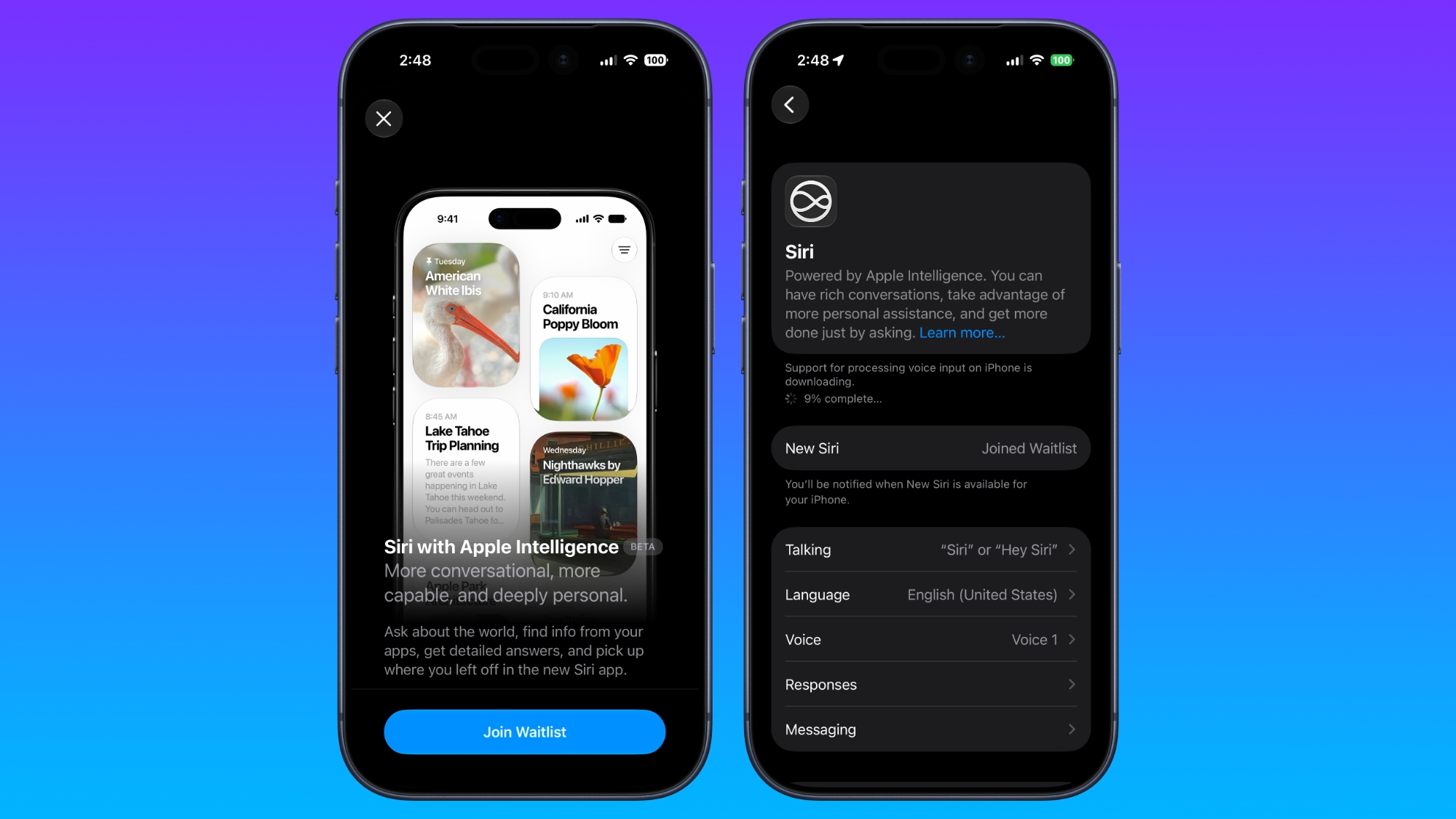
After updating to iOS 27, developers will need to open the Settings app, go to the Apple Intelligence section, and opt in to the waitlist to get access to Siri.
There is no word yet on how long the wait will be, but Apple used a similar waitlist when rolling out Apple Intelligence in iOS 18. It could be a matter of hours for some of the first developers to update to iOS 27.
The new Siri and Apple Intelligence features that Apple introduced today are available on all devices that support Apple Intelligence, but some on-device capabilities will be limited to newer iPhones, iPads, and Macs.
Siri AI is free, but Apple does have daily limits on some capabilities like image generation. Opting into an iCloud+ subscription plan increases AI limits. Siri AI is limited to English, and it is not available in the European Union on the iPhone or the iPad, but EU users can try it on Mac. Siri AI is not available in China.
This article, "How to Get iOS 27's New Siri AI: Join the Waitlist First" first appeared on MacRumors.com
Discuss this article in our forums
After updating to iOS 27, developers will need to open the Settings app, go to the Apple Intelligence section, and opt in to the waitlist to get access to Siri.
There is no word yet on how long the wait will be, but Apple used a similar waitlist when rolling out Apple Intelligence in iOS 18. It could be a matter of hours for some of the first developers to update to iOS 27.
The new Siri and Apple Intelligence features that Apple introduced today are available on all devices that support Apple Intelligence, but some on-device capabilities will be limited to newer iPhones, iPads, and Macs.
Siri AI is free, but Apple does have daily limits on some capabilities like image generation. Opting into an iCloud+ subscription plan increases AI limits. Siri AI is limited to English, and it is not available in the European Union on the iPhone or the iPad, but EU users can try it on Mac. Siri AI is not available in China.
Related Roundup: iOS 27
Tag: Siri
This article, "How to Get iOS 27's New Siri AI: Join the Waitlist First" first appeared on MacRumors.com
Discuss this article in our forums
Recommended Comments
Join the conversation
You can post now and register later. If you have an account, sign in now to post with your account.