_811205.png)
_e196d8.png)
_32b3d9.png)
_1c53fe.png)

iPhone 17 Pro models, it turns out, can't take photos in Night mode when Portrait mode is selected in the Camera app – a capability that's been available on Apple's Pro devices since the iPhone 12 Pro in 2020.

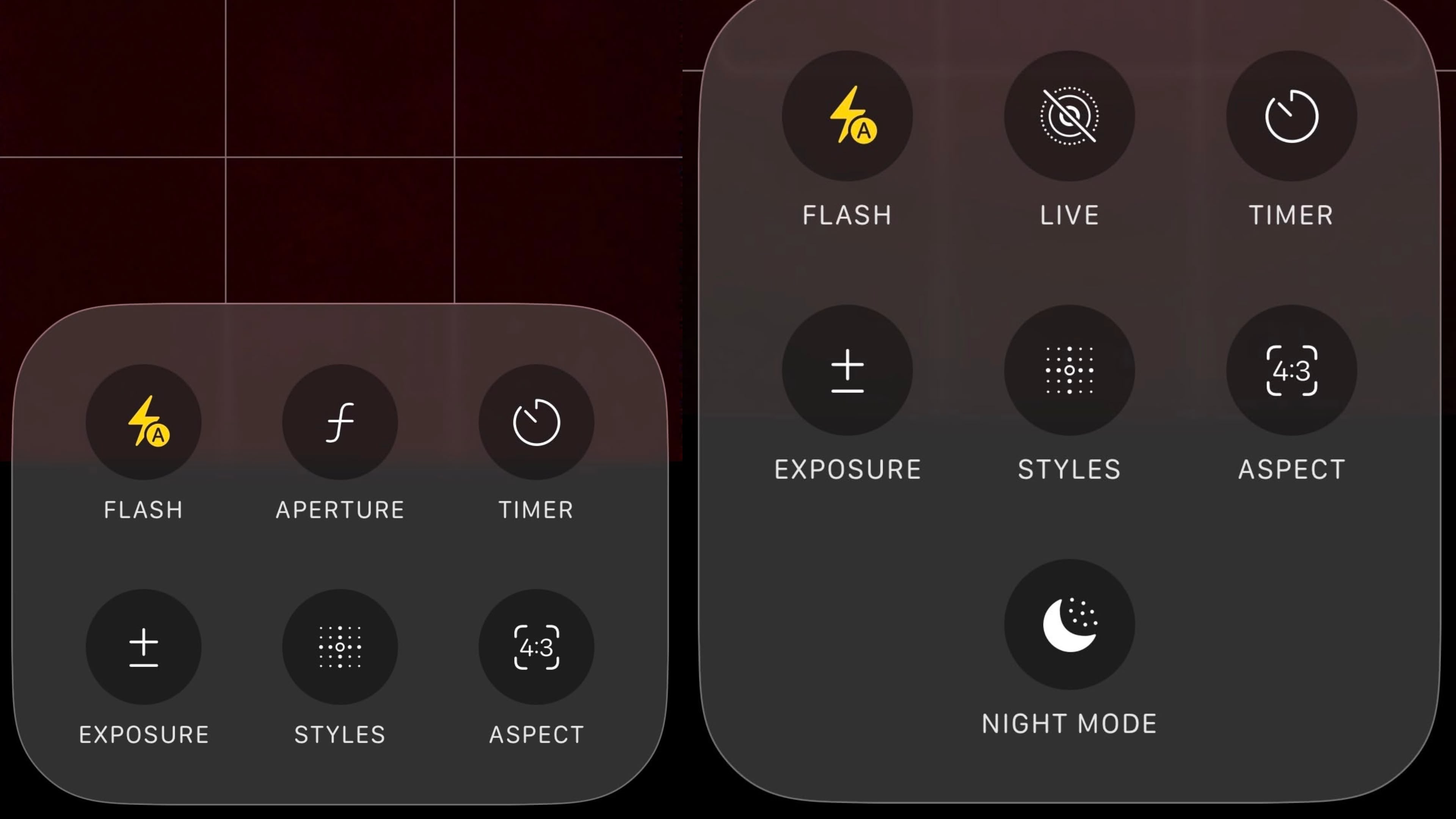
If you're an iPhone 17 Pro or iPhone 17 Pro Max owner, try it for yourself: Open the Camera app with Photo selected in the carousel, then cover the rear lenses with your hand to simulate a low-light environment. The Night mode crescent moon symbol should appear in the top-right corner of the UI, and if you tap the six dots icon in the same corner, you should see the Night mode button in the options panel.
Now choose Portrait in the carousel and perform the same low-light simulation with your hand – no crescent symbol will appear, and you won't see any Night mode toggle in the options panel when you open it.
Owners of iPhone 16 Pro and other recent Pro models who perform this test won't see Night mode disappear in Portrait mode, and apparently this is all by design, according to Apple's own iOS 26 iPhone User Guide. As spotted by Macworld, the support document says you can only take Night mode photos with Portrait mode on the following models:
iPhone 12 Pro
iPhone 12 Pro Max
iPhone 13 Pro
iPhone 13 Pro Max
iPhone 14 Pro
iPhone 14 Pro Max
iPhone 15 Pro
iPhone 15 Pro Max
iPhone 16 Pro
iPhone 16 Pro Max
Users on Reddit and Apple's own discussion forums noticed the omission on iPhone 17 Pro models at least a couple of months ago, but it seems that the change was not widely known (though a DXOMARK Camera test conducted in September does appear to reference the limitation).
The omission is puzzling, since the iPhone 17 Pro's camera hardware should be capable of combining the two modes. It could be that photos taken with Night mode are limited to 12 megapixels, whereas Portrait photos can be captured at 24 megapixels.
Still, Apple has not officially explained why the feature is not available on its latest premium models, nor has it said whether the feature will arrive later as part of a coming software update. Either way, we expect Apple will provide some commentary soon.
Until then, for users who relied on Night Mode portraits on earlier Pro models, it probably feels like a downgrade.
This article, "iPhone 17 Pro Lost a Camera Feature Pro Models Have Had Since 2020" first appeared on MacRumors.com
Discuss this article in our forums
If you're an iPhone 17 Pro or iPhone 17 Pro Max owner, try it for yourself: Open the Camera app with Photo selected in the carousel, then cover the rear lenses with your hand to simulate a low-light environment. The Night mode crescent moon symbol should appear in the top-right corner of the UI, and if you tap the six dots icon in the same corner, you should see the Night mode button in the options panel.
Now choose Portrait in the carousel and perform the same low-light simulation with your hand – no crescent symbol will appear, and you won't see any Night mode toggle in the options panel when you open it.
Owners of iPhone 16 Pro and other recent Pro models who perform this test won't see Night mode disappear in Portrait mode, and apparently this is all by design, according to Apple's own iOS 26 iPhone User Guide. As spotted by Macworld, the support document says you can only take Night mode photos with Portrait mode on the following models:
iPhone 12 Pro
iPhone 12 Pro Max
iPhone 13 Pro
iPhone 13 Pro Max
iPhone 14 Pro
iPhone 14 Pro Max
iPhone 15 Pro
iPhone 15 Pro Max
iPhone 16 Pro
iPhone 16 Pro Max
Users on Reddit and Apple's own discussion forums noticed the omission on iPhone 17 Pro models at least a couple of months ago, but it seems that the change was not widely known (though a DXOMARK Camera test conducted in September does appear to reference the limitation).
Missing Night Mode option in Camera app's Portrait mode (left) vs. Photo mode
The omission is puzzling, since the iPhone 17 Pro's camera hardware should be capable of combining the two modes. It could be that photos taken with Night mode are limited to 12 megapixels, whereas Portrait photos can be captured at 24 megapixels.
Still, Apple has not officially explained why the feature is not available on its latest premium models, nor has it said whether the feature will arrive later as part of a coming software update. Either way, we expect Apple will provide some commentary soon.
Until then, for users who relied on Night Mode portraits on earlier Pro models, it probably feels like a downgrade.
Related Roundup: iPhone 17 Pro
Buyer's Guide: iPhone 17 Pro (Buy Now)
Related Forum: iPhone
This article, "iPhone 17 Pro Lost a Camera Feature Pro Models Have Had Since 2020" first appeared on MacRumors.com
Discuss this article in our forums
Recommended Comments
Join the conversation
You can post now and register later. If you have an account, sign in now to post with your account.