_811205.png)
_e196d8.png)
_32b3d9.png)
_1c53fe.png)

Apple today released Pixelmator Pro for the iPad, complete with a new touch-optimized workspace, full Apple Pencil support, the ability to work between iPad and Mac, and all of the powerful editing tools from the Mac version.
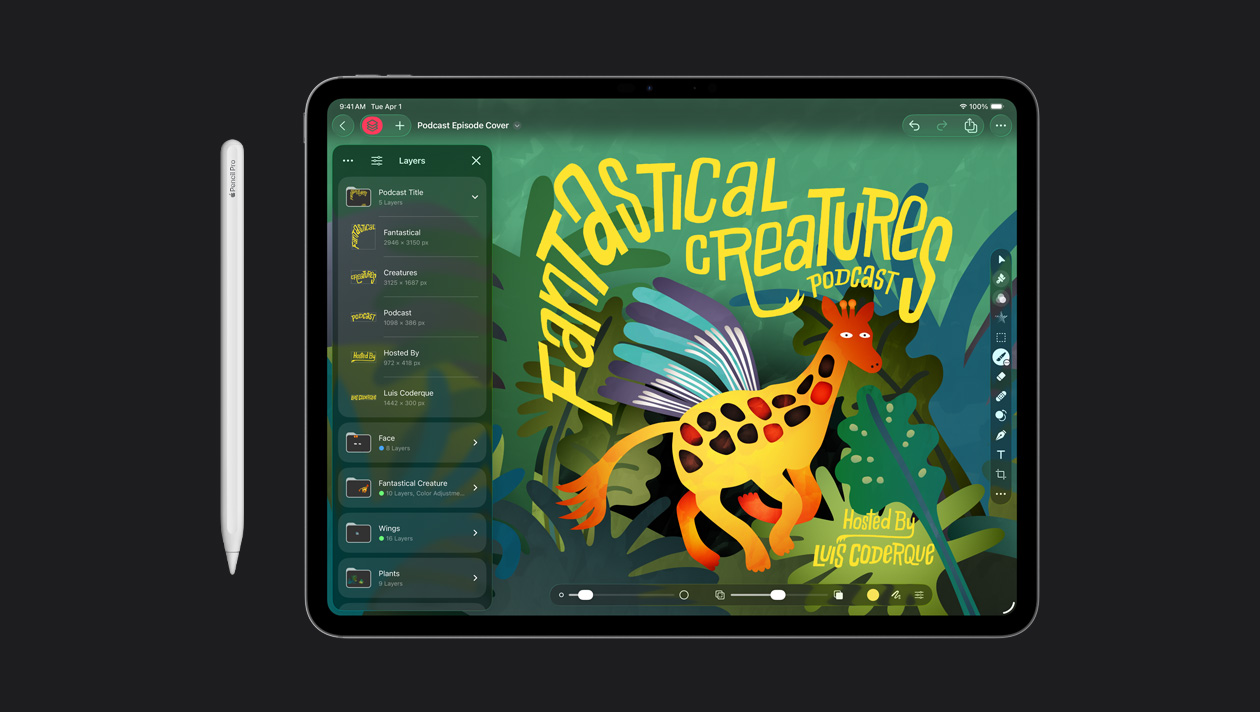
Pixelmator Pro is a popular image editing app that was acquired by Apple last year. There is already a more basic Pixelmator app available for the iPad and iPhone, but Apple says that app is "no longer being updated." To receive new features going forward, iPad users will need to move to the full-fledged Pixelmator Pro app.
Apple says Pixelmator Pro for iPad is compatible with iPad models equipped with the A16, A17 Pro, or M1 chip or later on iPadOS 26 or later.
Here are some of the Pixelmator Pro for iPad features highlighted by Apple:
Smart selection tools for isolating and editing specific parts of images
Advanced bitmap and vector masks
Super Resolution for intelligently upscaling photos
Deband for removing compression artifacts
Auto Crop with automatic composition suggestions
Apple Pencil support for pressure-sensitive brushing, plus hover, squeeze, and double tapPixelmator Pro for both iPad and Mac is available through the new Apple Creator Studio subscription bundle, which in the U.S. costs $12.99 per month or $129 per year. A one-time $49.99 purchase option remains available for the Mac app.
Some new "intelligent features" and "premium content" in Pixelmator Pro will only be available with an Apple Creator Studio subscription. For example, in both the iPad and Mac apps, Apple Creator Studio subscribers have access to a new Warp tool for twisting and shaping image layers. The one-time-purchase Mac app did not receive this feature.
This article, "Pixelmator Pro Launches on iPad With Apple Pencil Support and More" first appeared on MacRumors.com
Discuss this article in our forums
Pixelmator Pro is a popular image editing app that was acquired by Apple last year. There is already a more basic Pixelmator app available for the iPad and iPhone, but Apple says that app is "no longer being updated." To receive new features going forward, iPad users will need to move to the full-fledged Pixelmator Pro app.
Apple says Pixelmator Pro for iPad is compatible with iPad models equipped with the A16, A17 Pro, or M1 chip or later on iPadOS 26 or later.
Here are some of the Pixelmator Pro for iPad features highlighted by Apple:
- A full-featured Layers sidebar allows creators to use images, shapes, text, and video
Smart selection tools for isolating and editing specific parts of images
Advanced bitmap and vector masks
Super Resolution for intelligently upscaling photos
Deband for removing compression artifacts
Auto Crop with automatic composition suggestions
Apple Pencil support for pressure-sensitive brushing, plus hover, squeeze, and double tapPixelmator Pro for both iPad and Mac is available through the new Apple Creator Studio subscription bundle, which in the U.S. costs $12.99 per month or $129 per year. A one-time $49.99 purchase option remains available for the Mac app.
Some new "intelligent features" and "premium content" in Pixelmator Pro will only be available with an Apple Creator Studio subscription. For example, in both the iPad and Mac apps, Apple Creator Studio subscribers have access to a new Warp tool for twisting and shaping image layers. The one-time-purchase Mac app did not receive this feature.
Tags: Apple Creator Studio, Pixelmator
This article, "Pixelmator Pro Launches on iPad With Apple Pencil Support and More" first appeared on MacRumors.com
Discuss this article in our forums
Recommended Comments
Join the conversation
You can post now and register later. If you have an account, sign in now to post with your account.