_811205.png)
_e196d8.png)
_32b3d9.png)
_1c53fe.png)

Did you know it's possible to take multiple Live Photos from your iPhone's photo library and turn them into a single continuous video? Keep reading to learn how it's done.

On iPhone and iPad, Live Photos bring your pictures to life by adding a few seconds of video before and after the shot, creating a living memory rather than a static image.
While Live Photos are great on their own, it's also possible to weave several together to create a video montage. This process transforms a collection of moments into a cohesive narrative, and offers an easier way to share and relive your memories.
Whether it's a series of shots from a special event, a day out with friends, or a compilation of everyday moments, the following steps show you how to turn several Live Photos into a video that can encapsulate their essence in a way that a single photo or traditional video might not.
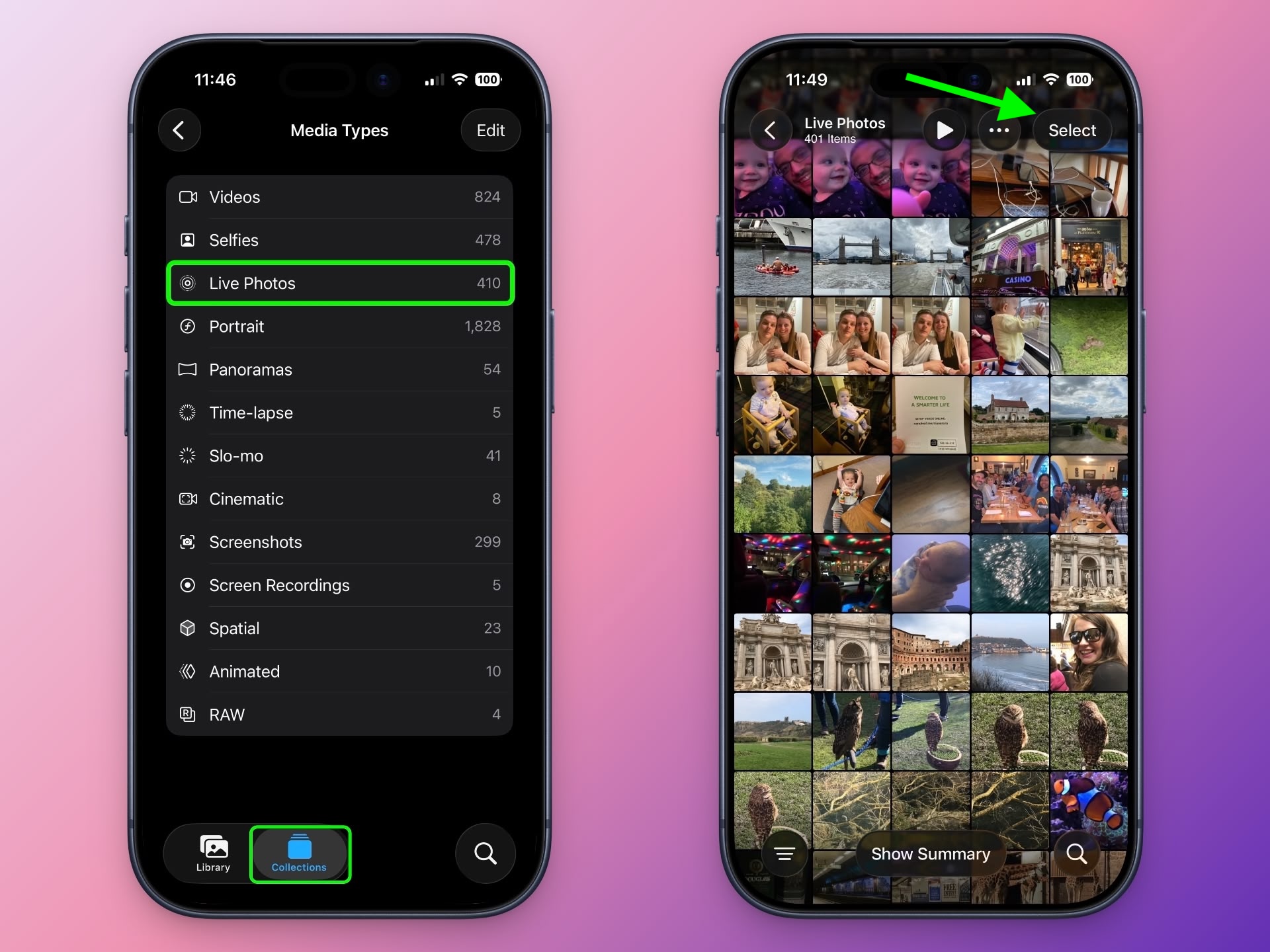
In the Photos app, tap the Collections icon at the bottom of the screen.
Scroll down to "Media Types," and tap Live Photos.
Tap Select in the top-right corner, then tap the Live Photos you want to include in your video so that a little checkmark appears on each one.
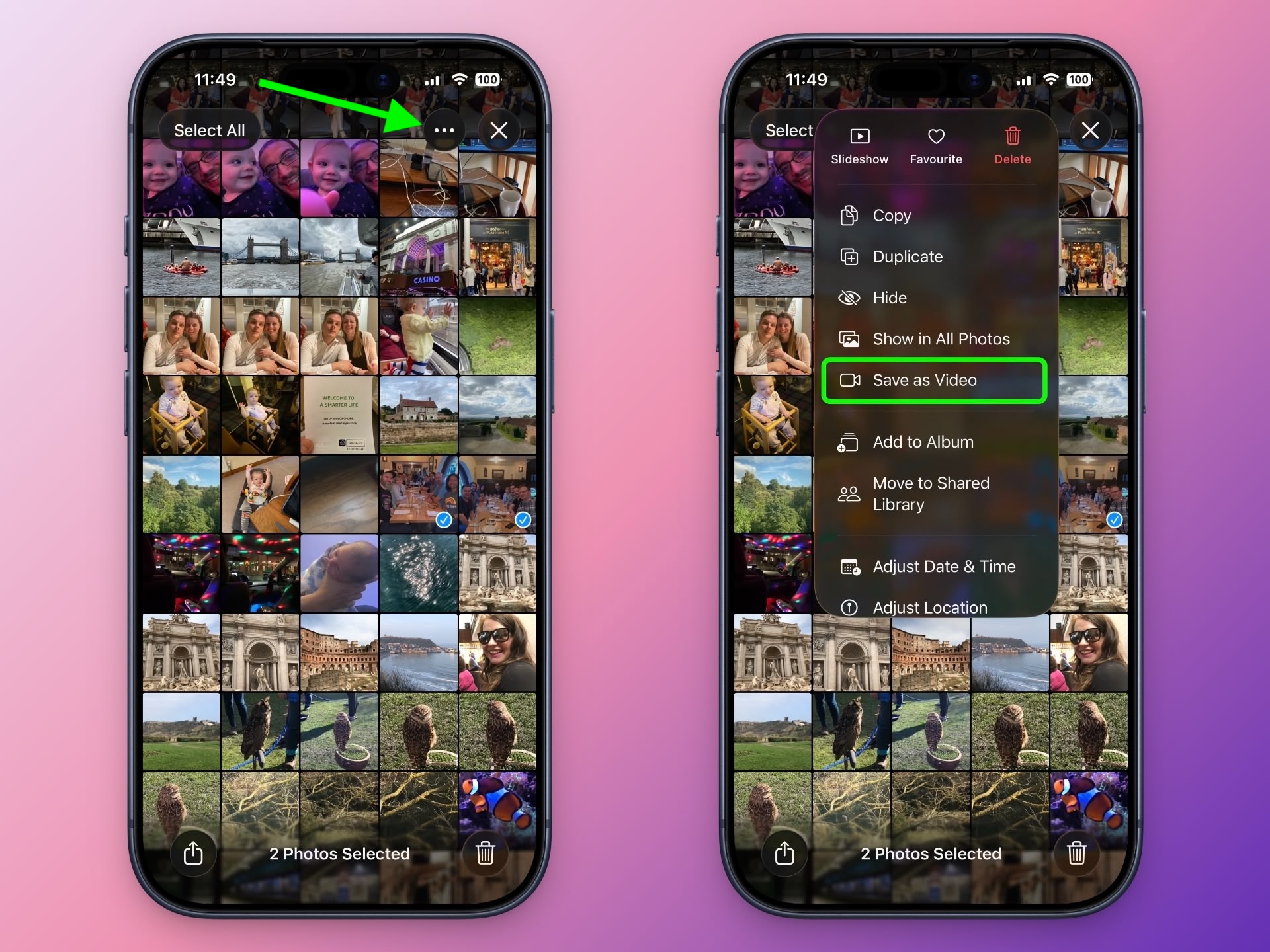
Tap the button with three dots in the top-right corner.
Choose Save as Video in the pop-up menu.
That's all there is to it. To watch your newly created video, return to the Library view or find it in the Videos category under Media Types.
Note that the video will be dated to when the Live Photos were originally taken, so unless you have the Sort by Recently Added option checked, they may not show as the latest video in your collection.
This article, "Turn Several Live Photos into a Single Video on iPhone" first appeared on MacRumors.com
Discuss this article in our forums
On iPhone and iPad, Live Photos bring your pictures to life by adding a few seconds of video before and after the shot, creating a living memory rather than a static image.
While Live Photos are great on their own, it's also possible to weave several together to create a video montage. This process transforms a collection of moments into a cohesive narrative, and offers an easier way to share and relive your memories.
Whether it's a series of shots from a special event, a day out with friends, or a compilation of everyday moments, the following steps show you how to turn several Live Photos into a video that can encapsulate their essence in a way that a single photo or traditional video might not.
In the Photos app, tap the Collections icon at the bottom of the screen.
Scroll down to "Media Types," and tap Live Photos.
Tap Select in the top-right corner, then tap the Live Photos you want to include in your video so that a little checkmark appears on each one.
Tap the button with three dots in the top-right corner.
Choose Save as Video in the pop-up menu.
That's all there is to it. To watch your newly created video, return to the Library view or find it in the Videos category under Media Types.
Note that the video will be dated to when the Live Photos were originally taken, so unless you have the Sort by Recently Added option checked, they may not show as the latest video in your collection.
Tag: Photos
This article, "Turn Several Live Photos into a Single Video on iPhone" first appeared on MacRumors.com
Discuss this article in our forums
Recommended Comments
Join the conversation
You can post now and register later. If you have an account, sign in now to post with your account.