_811205.png)
_e196d8.png)
_32b3d9.png)
_1c53fe.png)

WhatsApp is rolling out a new media attachment sheet on iOS, providing iPhone users with a faster way to share their most recent files without losing sight of the chat.

Usually in WhatsApp, sharing media within a chat requires you to tap a plus button to reveal the app's custom share sheet, and then tap into photos to see your full library, which takes over most of the screen.
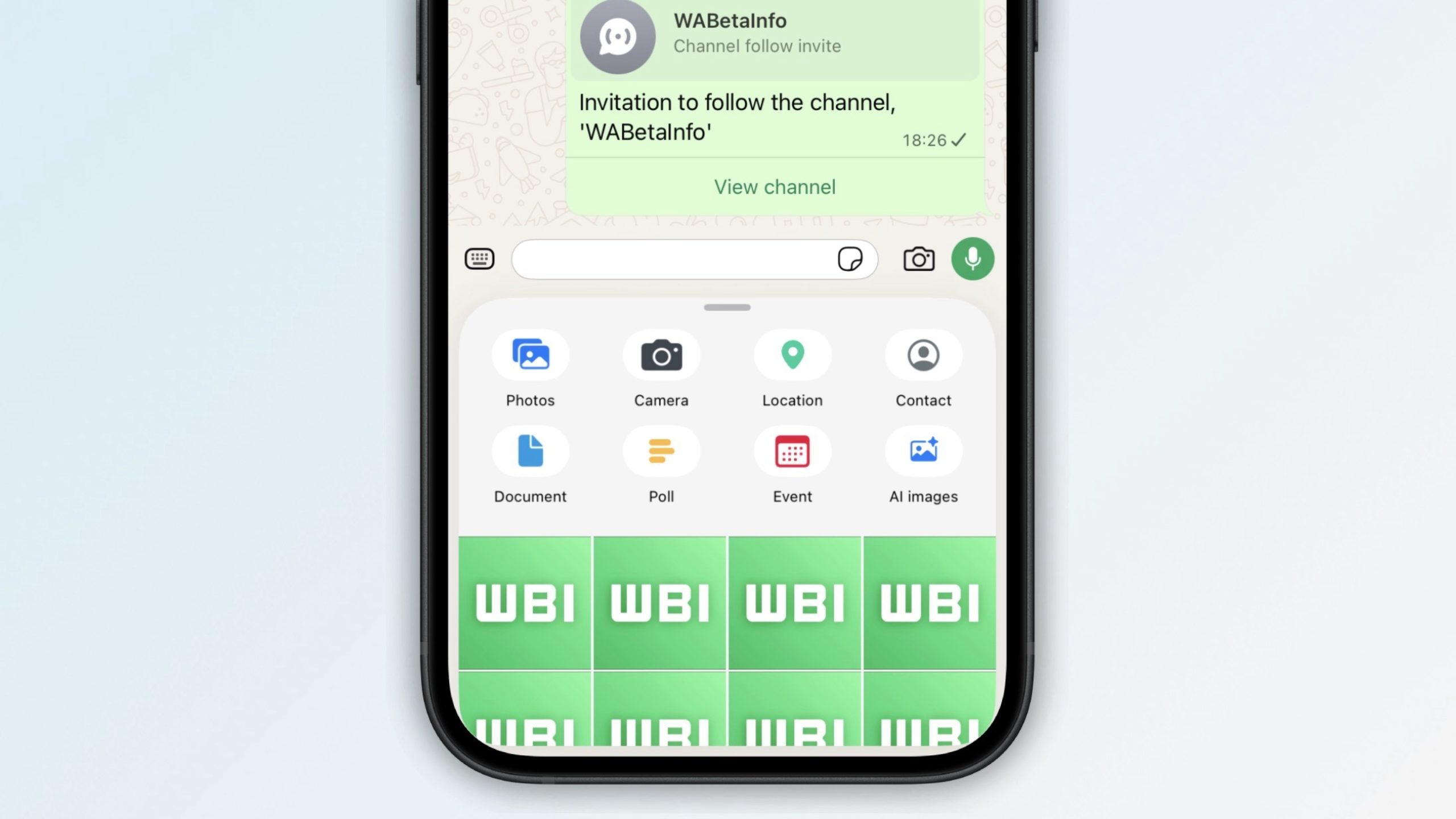
As spotted by app tinkerer WABetaInfo, the updated media sharing interface makes it easier to directly browse recent photos and videos without losing the thread of the conversation, thanks to a new recents section.
The recents section appears under the share menu icons as a compact 4x4 grid that acts as a horizontal strip that you can swipe through. If you keep scrolling to the end of the strip and still can't find what you're looking for, WhatsApp expands the view and reveals the full media gallery. It can also be quickly invoked by pressing and holding on the plus button in the input bar.
The new interface is showing up for some users of the latest WhatsApp for iOS 26.19.75, but not everyone who updates will see it immediately. It seems WhatsApp is still testing performance before a global rollout for iPhone users.
The latest change follows the recent introduction of WhatsApp's new Plus subscription for power users on iOS. It takes away nothing of the existing free functionality, but adds things like premium sticker packs, new interface colors, and new icons.
This article, "WhatsApp Begins Rolling Out Redesigned Media Share Sheet on iOS" first appeared on MacRumors.com
Discuss this article in our forums
Usually in WhatsApp, sharing media within a chat requires you to tap a plus button to reveal the app's custom share sheet, and then tap into photos to see your full library, which takes over most of the screen.
As spotted by app tinkerer WABetaInfo, the updated media sharing interface makes it easier to directly browse recent photos and videos without losing the thread of the conversation, thanks to a new recents section.
The recents section appears under the share menu icons as a compact 4x4 grid that acts as a horizontal strip that you can swipe through. If you keep scrolling to the end of the strip and still can't find what you're looking for, WhatsApp expands the view and reveals the full media gallery. It can also be quickly invoked by pressing and holding on the plus button in the input bar.
The new interface is showing up for some users of the latest WhatsApp for iOS 26.19.75, but not everyone who updates will see it immediately. It seems WhatsApp is still testing performance before a global rollout for iPhone users.
The latest change follows the recent introduction of WhatsApp's new Plus subscription for power users on iOS. It takes away nothing of the existing free functionality, but adds things like premium sticker packs, new interface colors, and new icons.
Tags: WABetaInfo, WhatsApp
This article, "WhatsApp Begins Rolling Out Redesigned Media Share Sheet on iOS" first appeared on MacRumors.com
Discuss this article in our forums
Recommended Comments
Join the conversation
You can post now and register later. If you have an account, sign in now to post with your account.